Sortment vs HubSpot for Email Marketing: Which Is Actually Built for Lifecycle?
HubSpot is built for lead nurture. Sortment is built for lifecycle. Compare email marketing capabilities, pricing, and AI to find the right fit.
Abhimanyu
·
Blogs
·

HubSpot built its reputation as a CRM and inbound marketing platform — the tool B2B sales and marketing teams use to manage leads, score contacts, and run nurture sequences before a deal closes. That reputation is well-earned in the context it was designed for. The question worth asking is whether that context matches yours.
This comparison is for teams evaluating HubSpot's Marketing Hub for email marketing, or already using it and hitting friction as lifecycle execution gets more demanding. If your team is focused on what happens after acquisition — activating users, retaining customers, winning back lapsed buyers — the distinction between a CRM with email bolted on and a purpose-built lifecycle platform matters considerably.
Category Comparison: Sortment vs HubSpot
Dimension | Sortment | HubSpot Marketing Hub |
Platform Type | AI-native lifecycle marketing platform | CRM with marketing automation |
Core Strength | Behavioral segmentation, AI-driven campaign execution | Lead nurture, CRM pipeline, B2B sales alignment |
Campaign Execution | AI-built audiences, auto-generated content, continuous monitoring | Workflow-based automation, contact list sends |
Channels | Email, push, SMS, WhatsApp, in-app, RCS | Email, SMS (paid add-on), ads, forms |
Analytics | Cohort retention, behavioral insights, lifecycle stage tracking | CRM reporting, pipeline metrics, contact activity |
Pricing Model | MAU-based, from ~$1,500/month | Contacts-based, from ~$800/month, scales steeply |
Best Suited For | Post-acquisition lifecycle and retention | B2B lead nurture and sales pipeline marketing |
What Is a Lifecycle Marketing Platform?
A lifecycle marketing platform is built for what happens after a user or customer exists: onboarding, activation, engagement, retention, and win-back. The campaigns are triggered by behavior — what someone did or did not do in your product — rather than contact list position or lead score. The goal is to move existing users forward, reduce churn, and increase revenue from the customer base you already have.
Marketing automation platforms built around CRM and lead nurture operate on a different logic. They track prospects through a sales pipeline and send messages based on where contacts sit in that funnel. That model works well for B2B pre-sales sequences. It runs into friction when the trigger needs to be behavioral: a user who opened the app three times last week but did not convert, or a subscriber who bought once but has not returned in 60 days. Those signals live in product or transaction data, not in a CRM contact record.
Sortment vs HubSpot for Email Marketing: A Quick Comparison
Feature | Sortment | HubSpot Marketing Hub |
Behavioral event triggers | Real-time, behavior-driven from data warehouse | Workflow-based, limited event depth |
Audience segmentation | AI-built, warehouse-native, no SQL required | Contact list and CRM property-based |
AI campaign creation | Strategy and content built by AI agents | AI-assisted content drafts, manual workflow setup |
Proactive opportunity alerts | Yes — flags cohort drops, upsell windows automatically | No — requires manual reporting to surface |
Cohort and retention analytics | Built-in, derived from warehouse data | Not native — requires integrations or add-ons |
Channel coverage | Email, push, SMS, WhatsApp, in-app, RCS | Email, SMS (paid add-on), ads |
Entry model | 30-day POC tied to one metric | Annual subscription |
Pricing basis | Monthly active users | Marketing contacts (scales steeply with list size) |
Best suited for | Post-acquisition lifecycle execution | Pre-acquisition lead nurture and CRM alignment |
Table: Side-by-side comparison of Sortment vs HubSpot for email marketing
Sortment is built for the retention and lifecycle layer. HubSpot is built for the lead-to-customer pipeline.
What Is Sortment?
How Sortment Works
Sortment connects directly to a team's existing data warehouse — BigQuery, Snowflake, or Redshift — and runs AI analysis on top of that data without requiring reverse ETL, middleware, or SQL from the marketing team. Marketers interact through a natural language interface: describe what you want to understand or do, and the platform builds the audience, writes the content, and sets up the campaign from that input.
The platform also runs continuously in the background. It monitors behavioral data, identifies growth opportunities and risk signals the team did not specifically look for, and surfaces them as alerts before they appear in a weekly report. A cohort dropping off, a conversion flow losing users, a segment ready to upsell — these surface automatically rather than waiting for someone to go looking.
What one marketer built in a year
BryteBridge scaled a new brand from 2 states to 20 with one lifecycle marketer, no data engineering team, and Sortment.
10x
Revenue, year-over-year
2,000+
Campaigns shipped in 12 months
1
Marketer. No engineers.
What one marketer built in a year
BryteBridge scaled a new brand from 2 states to 20 with one lifecycle marketer, no data engineering team, and Sortment.
10x
Revenue, year-over-year
2,000+
Campaigns shipped in 12 months
1
Marketer. No engineers.
What one marketer built in a year
BryteBridge scaled a new brand from 2 states to 20 with one lifecycle marketer, no data engineering team, and Sortment.
10x
Revenue, year-over-year
2,000+
Campaigns shipped in 12 months
1
Marketer. No engineers.
Key Sortment Features
Proactive opportunity identification: flags cohort drops, upsell windows, and win-back moments before the team spots them in a report
AI-driven campaign execution: builds the audience, writes the content, sets up and monitors the campaign — your team reviews and approves
30-day proof of concept: tied to one metric you choose (retention, activation, or conversion), not an annual commitment
Omnichannel execution: email, push, SMS, WhatsApp, in-app, and RCS from a single platform
Direct data warehouse connection: no pipeline middleware, no reverse ETL, no engineering queue for segment changes
What Is HubSpot?
How HubSpot Works
HubSpot is a CRM platform with marketing, sales, and service software built on top of it. Marketing Hub — its email and marketing automation product — lets teams create email campaigns, build contact workflows, manage ads, and track engagement through a CRM-connected lens. The core logic is contact-centric: who is this person, where are they in the pipeline, and what action should they receive next based on a property or condition.
HubSpot is well-suited when sales and marketing operate together and the customer journey can be described as a linear pipeline from lead to close. It is less suited to post-acquisition scenarios where triggers are behavioral and the relevant data lives in a product database or warehouse rather than a contact record.
Key HubSpot Features
CRM with workflow automation: if/then logic, contact property triggers, pipeline-aligned sends
Email campaign builder: drag-and-drop templates, A/B testing, deliverability tools
Landing pages, forms, and ad management: full inbound marketing stack in one platform
CRM-aligned reporting: deal pipeline, contact activity, revenue attribution tied to marketing touches
AI content tools: draft assist, subject line suggestions, content recommendations within the editor
Sortment vs HubSpot: Lifecycle Marketing Capabilities
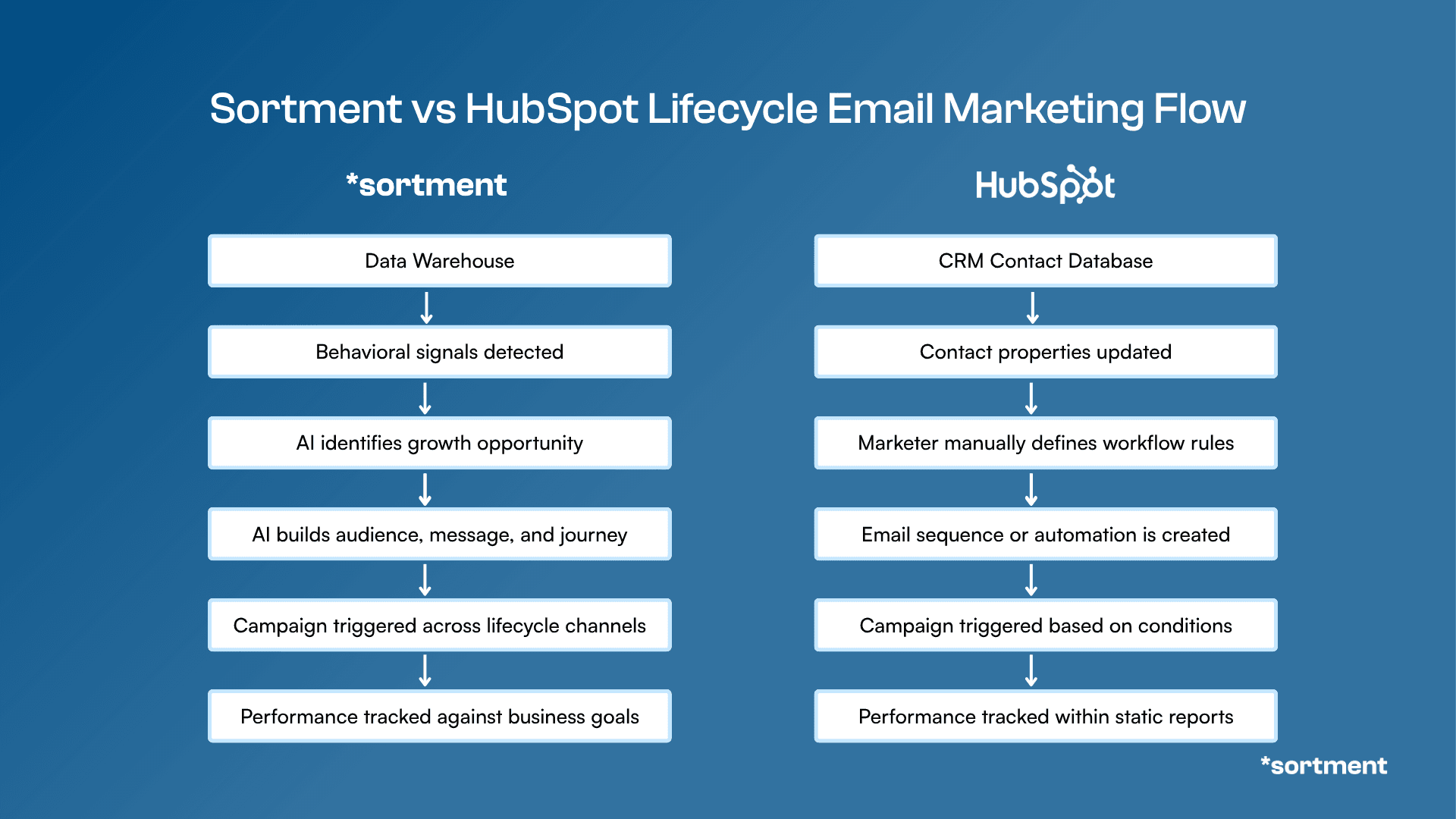
The clearest way to see the difference between these two platforms is to look at what drives a campaign: a rule you set in advance, or a behavioral signal the platform detects on its own.
Sortment
Sortment's execution model starts with behavioral analysis. The platform monitors user activity in the data warehouse, identifies moments worth acting on — a segment going quiet, a conversion flow dropping off, a cohort that is ready to upsell — and then builds and runs the campaign from that signal. The strategy and execution both happen inside the platform. There is no manual segment-building step before the campaign can run.
The team's role in this model is review and approval, not configuration from scratch. The platform tells your team what campaigns to run, which segments to target, and what is working and why. Teams that would otherwise need a lifecycle strategist and a data analyst to answer those questions get both functions without additional headcount.
Find lifecycle growth opportunities with Sortment AI
See how Strategy AI monitors your customer data, surfaces growth opportunities, and recommends campaigns tied to activation, retention, or monetization.
Find lifecycle growth opportunities with Sortment AI
See how Strategy AI monitors your customer data, surfaces growth opportunities, and recommends campaigns tied to activation, retention, or monetization.
Find lifecycle growth opportunities with Sortment AI
See how Strategy AI monitors your customer data, surfaces growth opportunities, and recommends campaigns tied to activation, retention, or monetization.
HubSpot
HubSpot's automation model centers on contact properties and workflow conditions. A workflow fires when a contact reaches a threshold: a lead score, a form submission, a date-based condition, or a contact property change. That logic works well when the campaign trigger is something you know in advance and can encode as a rule. It meets its limits when the trigger needs to be behavioral and the data comes from outside the CRM.
Connecting product event data to HubSpot workflows requires custom integrations or a third-party sync layer. Most teams doing serious lifecycle work end up running HubSpot alongside a separate analytics platform to get the behavioral visibility that HubSpot's native reporting does not provide. That adds cost and coordination overhead on top of an already full marketing stack.
Key takeaway
HubSpot handles lead nurture and CRM-aligned email well. When the goal shifts to behavioral lifecycle campaigns — activation flows, retention sequences, win-back triggers based on product inactivity — the data connections and trigger logic those campaigns need are not native to the platform.

Figure: Comparison of how Sortment vs HubSpot approach lifecycle email marketing
Sortment vs HubSpot: Analytics and Insights
Sortment Analytics
Sortment's analytics are lifecycle-first. Cohort retention, conversion stage tracking, and behavioral segmentation are all built directly from warehouse data — no separate analytics tool required. The platform also generates proactive alerts: a cohort dropping below a retention threshold, a campaign underperforming against a benchmark, a segment showing early signs of churn. Teams do not need to check a dashboard to find these signals; the platform surfaces them.
HubSpot Analytics
HubSpot's reporting is built around CRM data. It is strong for pipeline metrics — deals won, time to close, revenue attributed to specific marketing touches, and contact activity timelines. The gap shows up in cohort analysis and behavioral segmentation, which are not native to the platform. Those reports typically require connecting HubSpot to a separate BI tool or product analytics layer. Teams evaluating the analytics side of this comparison may find it useful to read how Sortment compares to Mixpanel on analytics depth, since the difference between CRM reporting and behavioral lifecycle analytics shows up clearly in that comparison as well.
Sortment vs HubSpot: Pricing
HubSpot Marketing Hub Professional starts at around $800 per month billed annually, and the contacts-based model means that cost grows as your list does. At 50,000 marketing contacts the fee increases materially; at 200,000 contacts, it is a significant line item in most marketing budgets before a single behavioral campaign has run. Teams building lifecycle programs across a large customer base often find that HubSpot's cost scales faster than the return it delivers on retention and activation outcomes specifically.
Sortment's pricing is MAU-based, starting at around $100-$500 per month, and the entry model is a 30-day proof of concept tied to one metric you define — not an annual commitment. That structure shifts the risk: you evaluate impact on a specific outcome before locking into a long-term contract.
“I feel like I'm able to, in 20% of my time, execute on what normally a team of three to five full time lifecycle marketers would do — without needing engineering, data or shared resources.”
Drew Price, VP, Growth Marketing, BryteBridge Group
“I feel like I'm able to, in 20% of my time, execute on what normally a team of three to five full time lifecycle marketers would do — without needing engineering, data or shared resources.”
Drew Price, VP, Growth Marketing, BryteBridge Group
“I feel like I'm able to, in 20% of my time, execute on what normally a team of three to five full time lifecycle marketers would do — without needing engineering, data or shared resources.”
Drew Price, VP, Growth Marketing, BryteBridge Group
When Should You Choose Sortment?
Your challenge is post-acquisition: activating, retaining, and winning back existing users or customers rather than generating new leads
Your campaigns need to be triggered by product behavior — what users did or did not do — not by contact list position or a CRM property
You want the platform to surface what to work on next, not just execute the campaigns your team has already planned
Your team is small and cannot separately staff a lifecycle strategist and a data analyst
You want to tie your evaluation to a specific metric and see results within 30 days before committing to a long-term contract
A nonprofit engagement platform we work with cut campaign launch time by 90% after switching from a workflow-based tool to Sortment. The shift was less about channel coverage and more about removing the manual steps between identifying a segment and getting a campaign live.
When Should You Choose HubSpot?
Your team's primary job is B2B lead nurture and CRM-aligned marketing, not post-acquisition lifecycle
Email campaigns are list-based: newsletters, nurture sequences, gated content follow-ups tied to sales pipeline stages
Sales and marketing alignment around a deal pipeline is a core operational requirement
You need forms, landing pages, and ad management in the same platform as email
Your team does not yet have a data warehouse, and behavioral segmentation at the product data level is not a current requirement
HubSpot is a strong choice when the problem matches what the platform was built to solve. Where teams run into trouble is when they try to use it for lifecycle work it was not designed to handle. Teams in that position often find that comparing purpose-built lifecycle platforms gives them a clearer picture of what is possible — the breakdown of Customer.io alternatives covers several of those options in a comparable lifecycle context.
Final Verdict: Sortment vs HubSpot for Email Marketing
HubSpot is the right tool when your email program is built around lead nurture, CRM pipeline management, and B2B sales alignment. It is one of the most complete platforms available for that specific job. The friction appears when teams ask it to run behavioral lifecycle campaigns for an existing customer base, because the data connections, trigger logic, and cohort analytics those campaigns require are not natively built in.
Sortment is built specifically for that layer: identifying which lifecycle campaigns to run, executing them from behavioral data, and monitoring performance continuously without requiring manual setup at each step.
Choose Sortment if your priority is retention, activation, or win-back of an existing user or customer base, and behavioral data needs to drive your campaigns.
Choose HubSpot if your priority is B2B lead nurture, sales pipeline alignment, and email campaigns where CRM properties and contact list logic drive the sends.
See what Sortment can do for your brand
A one-pager covering your industry's playbooks, potential outcomes and pilot plan. No sales call required.
See what Sortment can do for your brand
A one-pager covering your industry's playbooks, potential outcomes and pilot plan. No sales call required.
See what Sortment can do for your brand
A one-pager covering your industry's playbooks, potential outcomes and pilot plan. No sales call required.
Frequently Asked Questions About Sortment vs HubSpot for Email Marketing
Is HubSpot good for lifecycle email marketing?
HubSpot is better suited for B2B lead nurture and CRM-aligned email than for post-acquisition lifecycle marketing. Its automation model relies on contact properties and workflow conditions rather than behavioral event data, which limits how precisely you can target based on what users actually did in your product.
How does Sortment compare to HubSpot for email marketing?
Sortment identifies behavioral opportunities in your user data and acts on them — building audiences, writing content, and running campaigns based on product activity. HubSpot sends campaigns based on contact list properties and workflow conditions you define manually in advance. The core difference is where the intelligence lives: built into the platform in Sortment's case, built into your manual configuration in HubSpot's.
Why does HubSpot get expensive for lifecycle teams?
HubSpot's contacts-based pricing means your bill grows as your customer list grows. Teams running lifecycle programs across a large user base often find that Marketing Hub becomes a significant cost before it delivers meaningful retention or activation lift on post-acquisition campaigns specifically.
Can Sortment replace HubSpot?
Sortment and HubSpot solve different problems. If your team needs CRM, lead scoring, forms, and B2B pipeline management, HubSpot handles those functions well. If the gap is lifecycle execution — behavioral campaigns, cohort analysis, AI-driven retention — Sortment is built for that layer and the two can run alongside each other without conflict.
What is the difference between marketing automation and lifecycle marketing?
Marketing automation, as most platforms implement it, is rule-based: a contact reaches condition X and receives message Y. Lifecycle marketing is behavioral: what did this user actually do, what does that signal about where they are in their journey, and what is the right intervention now. Most marketing automation tools handle the former. Lifecycle platforms are built for the latter.
What makes Sortment different from other HubSpot alternatives for email marketing?
Most platforms positioned as HubSpot alternatives replace the channel execution layer. Sortment adds a strategy and intelligence layer on top: it identifies which campaigns to run based on behavioral analysis, then executes them — rather than waiting for you to configure campaigns manually. The 30-day proof of concept model, tied to one outcome metric you define, is also distinct from the annual commitments most lifecycle platforms and HubSpot itself require.
Does HubSpot connect to a data warehouse?
HubSpot does not natively connect to data warehouses like BigQuery, Snowflake, or Redshift. Syncing data requires third-party integration tools or reverse ETL pipelines, which add middleware complexity and engineering maintenance. Sortment connects directly to the warehouse with no middleware required.
See also
Sortment vs Mixpanel: Which Platform is Better for Lifecycle Marketing?
Compare Sortment vs Mixpanel for lifecycle marketing. Discover differences in analytics, engagement, automation, and retention to choose the right customer engagement platform for your business.
See what Sortment can do for your goals.
Book a 30-minute call. We'll show you how the pilot works with your data and your stack.
AGENTS
CASE STUDIES
RESOURCES
AGENTS
CASE STUDIES
RESOURCES
HubSpot built its reputation as a CRM and inbound marketing platform — the tool B2B sales and marketing teams use to manage leads, score contacts, and run nurture sequences before a deal closes. That reputation is well-earned in the context it was designed for. The question worth asking is whether that context matches yours.
This comparison is for teams evaluating HubSpot's Marketing Hub for email marketing, or already using it and hitting friction as lifecycle execution gets more demanding. If your team is focused on what happens after acquisition — activating users, retaining customers, winning back lapsed buyers — the distinction between a CRM with email bolted on and a purpose-built lifecycle platform matters considerably.
Category Comparison: Sortment vs HubSpot
Dimension | Sortment | HubSpot Marketing Hub |
Platform Type | AI-native lifecycle marketing platform | CRM with marketing automation |
Core Strength | Behavioral segmentation, AI-driven campaign execution | Lead nurture, CRM pipeline, B2B sales alignment |
Campaign Execution | AI-built audiences, auto-generated content, continuous monitoring | Workflow-based automation, contact list sends |
Channels | Email, push, SMS, WhatsApp, in-app, RCS | Email, SMS (paid add-on), ads, forms |
Analytics | Cohort retention, behavioral insights, lifecycle stage tracking | CRM reporting, pipeline metrics, contact activity |
Pricing Model | MAU-based, from ~$1,500/month | Contacts-based, from ~$800/month, scales steeply |
Best Suited For | Post-acquisition lifecycle and retention | B2B lead nurture and sales pipeline marketing |
What Is a Lifecycle Marketing Platform?
A lifecycle marketing platform is built for what happens after a user or customer exists: onboarding, activation, engagement, retention, and win-back. The campaigns are triggered by behavior — what someone did or did not do in your product — rather than contact list position or lead score. The goal is to move existing users forward, reduce churn, and increase revenue from the customer base you already have.
Marketing automation platforms built around CRM and lead nurture operate on a different logic. They track prospects through a sales pipeline and send messages based on where contacts sit in that funnel. That model works well for B2B pre-sales sequences. It runs into friction when the trigger needs to be behavioral: a user who opened the app three times last week but did not convert, or a subscriber who bought once but has not returned in 60 days. Those signals live in product or transaction data, not in a CRM contact record.
Sortment vs HubSpot for Email Marketing: A Quick Comparison
Feature | Sortment | HubSpot Marketing Hub |
Behavioral event triggers | Real-time, behavior-driven from data warehouse | Workflow-based, limited event depth |
Audience segmentation | AI-built, warehouse-native, no SQL required | Contact list and CRM property-based |
AI campaign creation | Strategy and content built by AI agents | AI-assisted content drafts, manual workflow setup |
Proactive opportunity alerts | Yes — flags cohort drops, upsell windows automatically | No — requires manual reporting to surface |
Cohort and retention analytics | Built-in, derived from warehouse data | Not native — requires integrations or add-ons |
Channel coverage | Email, push, SMS, WhatsApp, in-app, RCS | Email, SMS (paid add-on), ads |
Entry model | 30-day POC tied to one metric | Annual subscription |
Pricing basis | Monthly active users | Marketing contacts (scales steeply with list size) |
Best suited for | Post-acquisition lifecycle execution | Pre-acquisition lead nurture and CRM alignment |
Table: Side-by-side comparison of Sortment vs HubSpot for email marketing
Sortment is built for the retention and lifecycle layer. HubSpot is built for the lead-to-customer pipeline.
What Is Sortment?
How Sortment Works
Sortment connects directly to a team's existing data warehouse — BigQuery, Snowflake, or Redshift — and runs AI analysis on top of that data without requiring reverse ETL, middleware, or SQL from the marketing team. Marketers interact through a natural language interface: describe what you want to understand or do, and the platform builds the audience, writes the content, and sets up the campaign from that input.
The platform also runs continuously in the background. It monitors behavioral data, identifies growth opportunities and risk signals the team did not specifically look for, and surfaces them as alerts before they appear in a weekly report. A cohort dropping off, a conversion flow losing users, a segment ready to upsell — these surface automatically rather than waiting for someone to go looking.
What one marketer built in a year
BryteBridge scaled a new brand from 2 states to 20 with one lifecycle marketer, no data engineering team, and Sortment.
10x
Revenue, year-over-year
2,000+
Campaigns shipped in 12 months
1
Marketer. No engineers.
What one marketer built in a year
BryteBridge scaled a new brand from 2 states to 20 with one lifecycle marketer, no data engineering team, and Sortment.
10x
Revenue, year-over-year
2,000+
Campaigns shipped in 12 months
1
Marketer. No engineers.
What one marketer built in a year
BryteBridge scaled a new brand from 2 states to 20 with one lifecycle marketer, no data engineering team, and Sortment.
10x
Revenue, year-over-year
2,000+
Campaigns shipped in 12 months
1
Marketer. No engineers.
Key Sortment Features
Proactive opportunity identification: flags cohort drops, upsell windows, and win-back moments before the team spots them in a report
AI-driven campaign execution: builds the audience, writes the content, sets up and monitors the campaign — your team reviews and approves
30-day proof of concept: tied to one metric you choose (retention, activation, or conversion), not an annual commitment
Omnichannel execution: email, push, SMS, WhatsApp, in-app, and RCS from a single platform
Direct data warehouse connection: no pipeline middleware, no reverse ETL, no engineering queue for segment changes
What Is HubSpot?
How HubSpot Works
HubSpot is a CRM platform with marketing, sales, and service software built on top of it. Marketing Hub — its email and marketing automation product — lets teams create email campaigns, build contact workflows, manage ads, and track engagement through a CRM-connected lens. The core logic is contact-centric: who is this person, where are they in the pipeline, and what action should they receive next based on a property or condition.
HubSpot is well-suited when sales and marketing operate together and the customer journey can be described as a linear pipeline from lead to close. It is less suited to post-acquisition scenarios where triggers are behavioral and the relevant data lives in a product database or warehouse rather than a contact record.
Key HubSpot Features
CRM with workflow automation: if/then logic, contact property triggers, pipeline-aligned sends
Email campaign builder: drag-and-drop templates, A/B testing, deliverability tools
Landing pages, forms, and ad management: full inbound marketing stack in one platform
CRM-aligned reporting: deal pipeline, contact activity, revenue attribution tied to marketing touches
AI content tools: draft assist, subject line suggestions, content recommendations within the editor
Sortment vs HubSpot: Lifecycle Marketing Capabilities
The clearest way to see the difference between these two platforms is to look at what drives a campaign: a rule you set in advance, or a behavioral signal the platform detects on its own.
Sortment
Sortment's execution model starts with behavioral analysis. The platform monitors user activity in the data warehouse, identifies moments worth acting on — a segment going quiet, a conversion flow dropping off, a cohort that is ready to upsell — and then builds and runs the campaign from that signal. The strategy and execution both happen inside the platform. There is no manual segment-building step before the campaign can run.
The team's role in this model is review and approval, not configuration from scratch. The platform tells your team what campaigns to run, which segments to target, and what is working and why. Teams that would otherwise need a lifecycle strategist and a data analyst to answer those questions get both functions without additional headcount.
Find lifecycle growth opportunities with Sortment AI
See how Strategy AI monitors your customer data, surfaces growth opportunities, and recommends campaigns tied to activation, retention, or monetization.
Find lifecycle growth opportunities with Sortment AI
See how Strategy AI monitors your customer data, surfaces growth opportunities, and recommends campaigns tied to activation, retention, or monetization.
Find lifecycle growth opportunities with Sortment AI
See how Strategy AI monitors your customer data, surfaces growth opportunities, and recommends campaigns tied to activation, retention, or monetization.
HubSpot
HubSpot's automation model centers on contact properties and workflow conditions. A workflow fires when a contact reaches a threshold: a lead score, a form submission, a date-based condition, or a contact property change. That logic works well when the campaign trigger is something you know in advance and can encode as a rule. It meets its limits when the trigger needs to be behavioral and the data comes from outside the CRM.
Connecting product event data to HubSpot workflows requires custom integrations or a third-party sync layer. Most teams doing serious lifecycle work end up running HubSpot alongside a separate analytics platform to get the behavioral visibility that HubSpot's native reporting does not provide. That adds cost and coordination overhead on top of an already full marketing stack.
Key takeaway
HubSpot handles lead nurture and CRM-aligned email well. When the goal shifts to behavioral lifecycle campaigns — activation flows, retention sequences, win-back triggers based on product inactivity — the data connections and trigger logic those campaigns need are not native to the platform.

Figure: Comparison of how Sortment vs HubSpot approach lifecycle email marketing
Sortment vs HubSpot: Analytics and Insights
Sortment Analytics
Sortment's analytics are lifecycle-first. Cohort retention, conversion stage tracking, and behavioral segmentation are all built directly from warehouse data — no separate analytics tool required. The platform also generates proactive alerts: a cohort dropping below a retention threshold, a campaign underperforming against a benchmark, a segment showing early signs of churn. Teams do not need to check a dashboard to find these signals; the platform surfaces them.
HubSpot Analytics
HubSpot's reporting is built around CRM data. It is strong for pipeline metrics — deals won, time to close, revenue attributed to specific marketing touches, and contact activity timelines. The gap shows up in cohort analysis and behavioral segmentation, which are not native to the platform. Those reports typically require connecting HubSpot to a separate BI tool or product analytics layer. Teams evaluating the analytics side of this comparison may find it useful to read how Sortment compares to Mixpanel on analytics depth, since the difference between CRM reporting and behavioral lifecycle analytics shows up clearly in that comparison as well.
Sortment vs HubSpot: Pricing
HubSpot Marketing Hub Professional starts at around $800 per month billed annually, and the contacts-based model means that cost grows as your list does. At 50,000 marketing contacts the fee increases materially; at 200,000 contacts, it is a significant line item in most marketing budgets before a single behavioral campaign has run. Teams building lifecycle programs across a large customer base often find that HubSpot's cost scales faster than the return it delivers on retention and activation outcomes specifically.
Sortment's pricing is MAU-based, starting at around $100-$500 per month, and the entry model is a 30-day proof of concept tied to one metric you define — not an annual commitment. That structure shifts the risk: you evaluate impact on a specific outcome before locking into a long-term contract.
“I feel like I'm able to, in 20% of my time, execute on what normally a team of three to five full time lifecycle marketers would do — without needing engineering, data or shared resources.”
Drew Price, VP, Growth Marketing, BryteBridge Group
“I feel like I'm able to, in 20% of my time, execute on what normally a team of three to five full time lifecycle marketers would do — without needing engineering, data or shared resources.”
Drew Price, VP, Growth Marketing, BryteBridge Group
“I feel like I'm able to, in 20% of my time, execute on what normally a team of three to five full time lifecycle marketers would do — without needing engineering, data or shared resources.”
Drew Price, VP, Growth Marketing, BryteBridge Group
When Should You Choose Sortment?
Your challenge is post-acquisition: activating, retaining, and winning back existing users or customers rather than generating new leads
Your campaigns need to be triggered by product behavior — what users did or did not do — not by contact list position or a CRM property
You want the platform to surface what to work on next, not just execute the campaigns your team has already planned
Your team is small and cannot separately staff a lifecycle strategist and a data analyst
You want to tie your evaluation to a specific metric and see results within 30 days before committing to a long-term contract
A nonprofit engagement platform we work with cut campaign launch time by 90% after switching from a workflow-based tool to Sortment. The shift was less about channel coverage and more about removing the manual steps between identifying a segment and getting a campaign live.
When Should You Choose HubSpot?
Your team's primary job is B2B lead nurture and CRM-aligned marketing, not post-acquisition lifecycle
Email campaigns are list-based: newsletters, nurture sequences, gated content follow-ups tied to sales pipeline stages
Sales and marketing alignment around a deal pipeline is a core operational requirement
You need forms, landing pages, and ad management in the same platform as email
Your team does not yet have a data warehouse, and behavioral segmentation at the product data level is not a current requirement
HubSpot is a strong choice when the problem matches what the platform was built to solve. Where teams run into trouble is when they try to use it for lifecycle work it was not designed to handle. Teams in that position often find that comparing purpose-built lifecycle platforms gives them a clearer picture of what is possible — the breakdown of Customer.io alternatives covers several of those options in a comparable lifecycle context.
Final Verdict: Sortment vs HubSpot for Email Marketing
HubSpot is the right tool when your email program is built around lead nurture, CRM pipeline management, and B2B sales alignment. It is one of the most complete platforms available for that specific job. The friction appears when teams ask it to run behavioral lifecycle campaigns for an existing customer base, because the data connections, trigger logic, and cohort analytics those campaigns require are not natively built in.
Sortment is built specifically for that layer: identifying which lifecycle campaigns to run, executing them from behavioral data, and monitoring performance continuously without requiring manual setup at each step.
Choose Sortment if your priority is retention, activation, or win-back of an existing user or customer base, and behavioral data needs to drive your campaigns.
Choose HubSpot if your priority is B2B lead nurture, sales pipeline alignment, and email campaigns where CRM properties and contact list logic drive the sends.
See what Sortment can do for your brand
A one-pager covering your industry's playbooks, potential outcomes and pilot plan. No sales call required.
See what Sortment can do for your brand
A one-pager covering your industry's playbooks, potential outcomes and pilot plan. No sales call required.
See what Sortment can do for your brand
A one-pager covering your industry's playbooks, potential outcomes and pilot plan. No sales call required.
Frequently Asked Questions About Sortment vs HubSpot for Email Marketing
Is HubSpot good for lifecycle email marketing?
HubSpot is better suited for B2B lead nurture and CRM-aligned email than for post-acquisition lifecycle marketing. Its automation model relies on contact properties and workflow conditions rather than behavioral event data, which limits how precisely you can target based on what users actually did in your product.
How does Sortment compare to HubSpot for email marketing?
Sortment identifies behavioral opportunities in your user data and acts on them — building audiences, writing content, and running campaigns based on product activity. HubSpot sends campaigns based on contact list properties and workflow conditions you define manually in advance. The core difference is where the intelligence lives: built into the platform in Sortment's case, built into your manual configuration in HubSpot's.
Why does HubSpot get expensive for lifecycle teams?
HubSpot's contacts-based pricing means your bill grows as your customer list grows. Teams running lifecycle programs across a large user base often find that Marketing Hub becomes a significant cost before it delivers meaningful retention or activation lift on post-acquisition campaigns specifically.
Can Sortment replace HubSpot?
Sortment and HubSpot solve different problems. If your team needs CRM, lead scoring, forms, and B2B pipeline management, HubSpot handles those functions well. If the gap is lifecycle execution — behavioral campaigns, cohort analysis, AI-driven retention — Sortment is built for that layer and the two can run alongside each other without conflict.
What is the difference between marketing automation and lifecycle marketing?
Marketing automation, as most platforms implement it, is rule-based: a contact reaches condition X and receives message Y. Lifecycle marketing is behavioral: what did this user actually do, what does that signal about where they are in their journey, and what is the right intervention now. Most marketing automation tools handle the former. Lifecycle platforms are built for the latter.
What makes Sortment different from other HubSpot alternatives for email marketing?
Most platforms positioned as HubSpot alternatives replace the channel execution layer. Sortment adds a strategy and intelligence layer on top: it identifies which campaigns to run based on behavioral analysis, then executes them — rather than waiting for you to configure campaigns manually. The 30-day proof of concept model, tied to one outcome metric you define, is also distinct from the annual commitments most lifecycle platforms and HubSpot itself require.
Does HubSpot connect to a data warehouse?
HubSpot does not natively connect to data warehouses like BigQuery, Snowflake, or Redshift. Syncing data requires third-party integration tools or reverse ETL pipelines, which add middleware complexity and engineering maintenance. Sortment connects directly to the warehouse with no middleware required.