7 Best HubSpot Alternatives for Email Marketing (2026)
HubSpot alternatives for email marketing compared on pricing, automation, channels, and analytics. Find the right lifecycle platform for your team.
·
Blogs
·

Most teams searching for HubSpot alternatives for email marketing have already hit one of three walls. The first is price: contact-based billing that scales faster than revenue. The second is depth: workflows that work for CRM-triggered nurture but fall short once lifecycle campaigns need behavioral triggers, native push, or in-app messaging. The third is visibility: reporting that covers opens and clicks but stops short of cohort analysis, funnel breakdowns, or cross-campaign trends.
HubSpot is a strong CRM. Its email tools are tightly integrated with sales, forms, and lead scoring. For B2B inbound teams running nurture sequences off form fills and pipeline stages, it works. But when email stops being a CRM feature and starts being a lifecycle system, the gaps become hard to work around.
This guide covers seven alternatives built for teams that need deeper automation, broader channel coverage, or more transparent pricing than HubSpot's Marketing Hub provides.




What Should You Look for in a HubSpot Alternative?
Five criteria separate a genuine HubSpot alternative from a tool that will create the same frustrations at a different price point.
Scalability
HubSpot's contact-based pricing means costs rise with your database, not just your sending volume. One G2 reviewer called it the "Contact Tier Pricing Trap." A real alternative should scale on usage or sends, not penalize you for having a large audience you message selectively.
Omnichannel Capabilities
HubSpot natively supports email, ads, social, web, and chat. It does not natively support push notifications or in-app messaging, and SMS is a paid add-on limited to US numbers. If your lifecycle campaigns need to reach users inside a mobile app or across WhatsApp, push, and SMS globally, your alternative needs native support for those channels.
Ease of Use
HubSpot's email builder is praised for simplicity, but its workflow builder gets harder to manage as automation scales. Reviewers report debugging broken workflows is "more painful than it needs to be." The alternative should let your team build and maintain complex campaigns without engineering support or spreadsheet workarounds.
Analytics Depth
HubSpot has funnel reports, attribution, and custom dashboards. But cohort analysis is a known gap, customer journey analytics is Enterprise-only, and a six-year user reported still needing spreadsheets for cross-object reporting. The alternative should give your team funnel, cohort, and campaign-level visibility without a separate BI tool.
AI Capabilities
HubSpot's Breeze AI generates email drafts, subject lines, and workflow scaffolds. These are assistive features. They help with content creation but do not identify which campaigns to run, which cohorts need attention, or what is underperforming. A meaningful alternative should use AI to inform strategy, not only speed up execution.
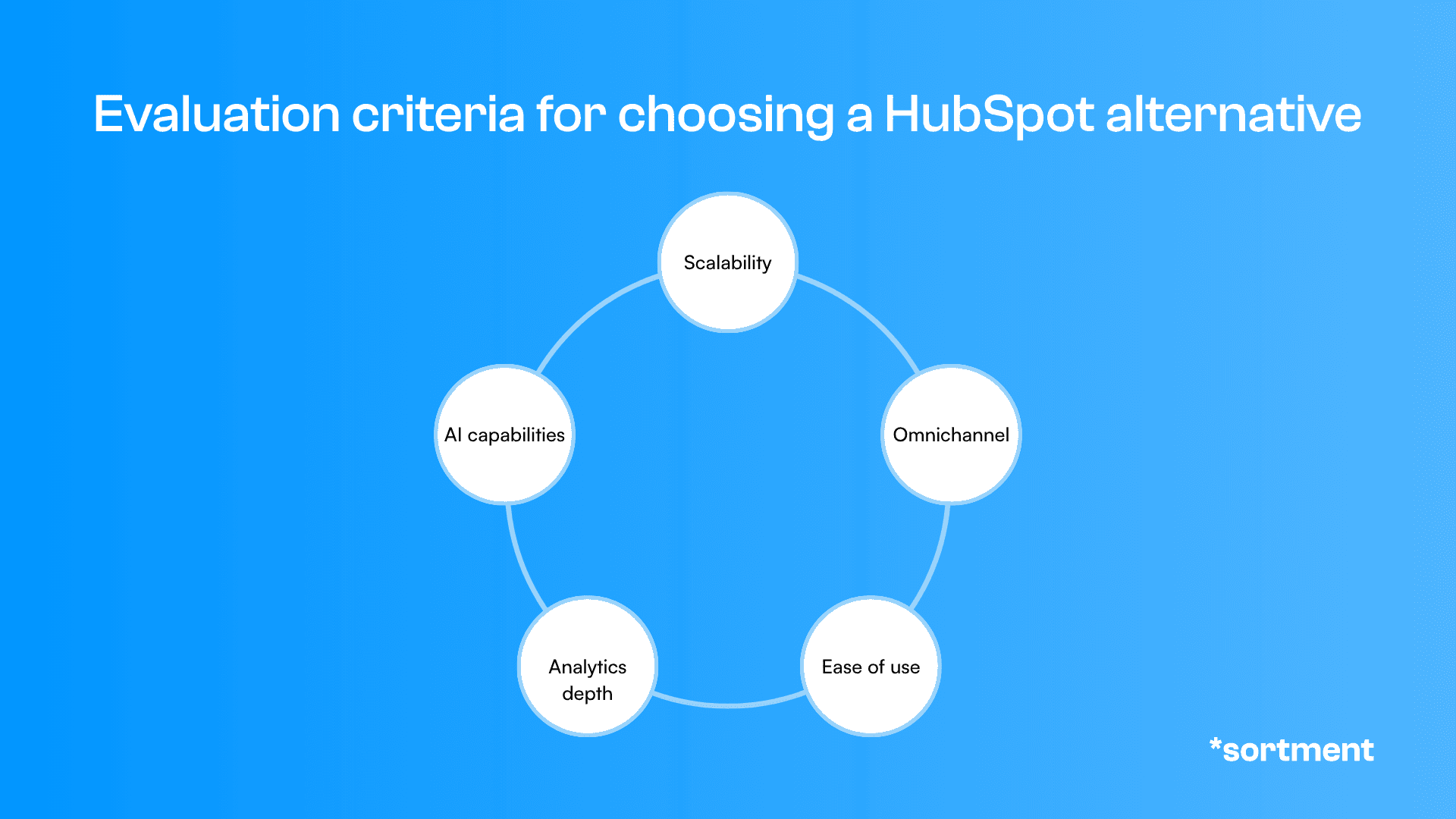
Figure: Evaluation criteria for choosing a HubSpot alternative
What Are the Best HubSpot Alternatives for Email Marketing in 2026?
These seven platforms each solve a different part of the problem that drives teams away from HubSpot's email tools. The comparison table below shows where each one fits.
Platform | Best For | Why It Stands Out | When to Choose |
Sortment | Teams that need strategy + execution without a separate analytics stack | AI agents identify opportunities, build audiences, and run campaigns from your warehouse | You want one platform for lifecycle intelligence and execution, with a 30-day POC |
Customer.io | Product-led teams with behavioral messaging needs | Real-time event triggers across email, SMS, push, and in-app | You need granular behavioral automation tied to product events |
ActiveCampaign | SMBs moving beyond basic email into CRM-connected automation | Deep automation builder at a fraction of HubSpot's price | You want strong automation without enterprise pricing |
Klaviyo | E-commerce brands with revenue attribution needs | Built around purchase data, cart events, and revenue-per-email metrics | Your lifecycle revolves around transactions and catalog data |
Iterable | Enterprise teams with dedicated lifecycle functions | Visual journey builder with cross-channel orchestration at scale | You have the team and infrastructure to operate a dedicated CEP |
Braze | Mobile-first companies with high-frequency engagement | Real-time data streaming with native push, in-app, and Content Cards | Your product is a mobile app and engagement is session-driven |
Mailchimp | Small teams that need affordable, simple email | Easy setup, generous free tier, basic automation | You need newsletters and simple sequences without complexity |
Table: Best HubSpot alternatives for email marketing
1. Sortment
Sortment is an AI-native lifecycle marketing platform built for teams that want the platform itself to identify what campaigns to run, not just execute what the team has already decided.
When to choose Sortment over HubSpot:
Your marketing team spends more time figuring out what to run than actually running it
You want lifecycle analytics (funnels, cohorts, sessions) in the same product where campaigns are built
You want to test the platform against a specific outcome before signing an annual contract
What actually stands out:
Sortment connects to your data warehouse and uses AI agents to analyze behavioral data, surface underperforming cohorts, and recommend specific campaigns. The data agent builds audiences from natural language descriptions. The content agent writes copy. The QA agent validates before every send. The background agent monitors active campaigns and flags anomalies without anyone asking. Your team reviews and approves rather than configuring from scratch. Entry is a 30-day proof of concept tied to one metric you define: retention, activation, or conversion.
Best for: Subscription products, PLG teams, mobile apps, and high-frequency engagement contexts where knowing what to run next matters as much as running it.
“I feel like I'm able to, in 20% of my time, execute on what normally a team of three to five full time lifecycle marketers would do — without needing engineering, data or shared resources.”
Drew Price, VP, Growth Marketing, BryteBridge Group
“I feel like I'm able to, in 20% of my time, execute on what normally a team of three to five full time lifecycle marketers would do — without needing engineering, data or shared resources.”
Drew Price, VP, Growth Marketing, BryteBridge Group
“I feel like I'm able to, in 20% of my time, execute on what normally a team of three to five full time lifecycle marketers would do — without needing engineering, data or shared resources.”
Drew Price, VP, Growth Marketing, BryteBridge Group
2. Customer.io
Customer.io is a messaging platform built for product-led and developer-friendly teams that need campaigns triggered by real-time behavioral events.
When to choose Customer.io over HubSpot:
Your campaigns need to fire on product events (feature used, milestone hit, plan upgraded), not just CRM field changes
You need native push and in-app alongside email and SMS
What actually stands out:
Customer.io's event-driven architecture means campaigns respond to what users do inside your product in real time. Journeys support email, SMS, push, and in-app natively. The workflow builder is code-optional but powerful enough for engineering teams to extend with liquid logic and webhooks. Pricing is based on profiles, not contacts-you-might-email, which scales more predictably than HubSpot's marketing contacts model.
Best for: SaaS and app teams with product-led growth motions where activation and retention depend on in-product behavior.
3. ActiveCampaign
ActiveCampaign combines email marketing, automation, and a lightweight CRM at a price point well below HubSpot's Marketing Hub Professional.
When to choose ActiveCampaign over HubSpot:
You want deep automation without paying $890/month for HubSpot Professional
You need CRM-connected email campaigns but not the full HubSpot ecosystem
What actually stands out:
ActiveCampaign's automation builder supports conditional branching, lead scoring, site tracking, and multi-step sequences at its Plus tier, around $49/month for small lists. That puts it in direct competition with HubSpot Professional's automation, which starts at $890/month. The tradeoff is that ActiveCampaign's CRM is lighter, its reporting is shallower, and it lacks HubSpot's sales and service hub ecosystem. For teams whose primary need is email automation rather than a full revenue operations suite, the economics are hard to argue with.
Best for: SMBs and mid-market teams that need marketing automation and CRM without enterprise pricing.
4. Klaviyo
Klaviyo is an email and SMS platform built specifically for e-commerce, with deep integrations into Shopify, WooCommerce, BigCommerce, and other storefront platforms.
When to choose Klaviyo over HubSpot:
Your lifecycle campaigns are driven by purchase events, cart abandonment, and product browsing data
You need revenue attribution tied directly to email and SMS sends
What actually stands out:
Klaviyo's data model is structured around transactions. Flows trigger on purchase, cart, browse, and catalog events natively. Revenue-per-email reporting is a default view, not a custom report. The platform also includes predictive analytics for customer lifetime value and churn risk at the cohort level. For e-commerce teams, this is a more natural fit than building product-event workflows inside HubSpot's CRM-centric automation. Pricing is contact-based but starts lower than HubSpot Professional, and the e-commerce integrations require less setup.
Best for: E-commerce brands on Shopify or similar platforms where purchase data drives the lifecycle.
5. Iterable
Iterable is an enterprise cross-channel customer engagement platform built for teams with dedicated lifecycle functions and existing analytics infrastructure.
When to choose Iterable over HubSpot:
You need journey orchestration across email, push, SMS, in-app, web, and WhatsApp at enterprise scale
Your team has the engineering resources and BI tooling to support a dedicated CEP
What actually stands out:
Iterable's journey builder handles complex multi-step flows with branching, entry conditions, exit rules, and A/B testing across all supported channels. Its channel breadth is wider than HubSpot's native set: email, push, SMS, in-app, web push, and WhatsApp are all configurable inside journeys. Nova AI handles send time optimization and channel selection. The tradeoff is cost (median annual contracts around $32,000 per third-party data), quote-based pricing, and a reliance on external analytics tools for org-wide reporting. For teams comparing options in this tier, see our breakdown of Braze alternatives.
Best for: Large B2C operations with mature lifecycle teams and existing data infrastructure.
6. Braze
Braze is a customer engagement platform built for mobile-first companies that need real-time messaging tied to in-product behavior.
When to choose Braze over HubSpot:
Your product is a mobile app and your campaigns depend on session data, feature usage, and in-app events
You need native push, in-app messages, and Content Cards alongside email and SMS
What actually stands out:
Braze processes behavioral data in real time and supports email, SMS/MMS/RCS, push, in-app, Content Cards, banners, webhooks, and WhatsApp inside its Canvas journey builder. That channel depth is significantly wider than HubSpot's native set. The platform is designed for high-frequency engagement patterns where message timing and in-session context matter. Pricing is enterprise-level, and implementation is substantial. But for mobile-first companies, the gap between HubSpot's CRM-centric model and Braze's product-behavior model is large enough that supplementing HubSpot with integrations is often harder than switching.
Best for: Mobile apps, gaming, media, and fintech with high-frequency product engagement.
7. Mailchimp
Mailchimp is an email marketing platform built for small businesses and teams that need simple, affordable campaigns without complex automation.
When to choose Mailchimp over HubSpot:
You need to send newsletters, announcements, and basic automations at low cost
You want to get started quickly without onboarding fees or annual contracts
What actually stands out:
Mailchimp's free tier supports up to 500 contacts with basic email and landing pages. Its paid plans start well below HubSpot's Starter and include a drag-and-drop builder, basic automation, and audience segmentation. The platform is not built for complex lifecycle orchestration, behavioral triggers, or multi-channel messaging. But for teams whose primary need is email, Mailchimp does it affordably and with minimal setup. It is also the most common platform teams use before they outgrow it and move to something with deeper automation.
Best for: Small businesses and early-stage teams that need email campaigns without complexity or high cost.
Which HubSpot Alternative Is Best for Your Use Case?
The right alternative depends on what specifically is not working about HubSpot for your team.
If your frustration is pricing, ActiveCampaign gives you comparable automation at a fraction of the cost. Mailchimp is even cheaper for basic email.
If you need behavioral triggers from product data, not just CRM field changes, Customer.io or Braze are built for that. Customer.io is the more accessible option for mid-market teams. Braze is the enterprise-grade choice for mobile-first products.
If you need lifecycle strategy and execution in one platform without building a separate analytics stack around it, Sortment handles both. A DTC personal care brand saw a 23% increase in CTR after its AI identified audience segments the team had not previously targeted. The gain came from targeting the right segments, not from running more campaigns.
If your lifecycle is transaction-driven, Klaviyo's e-commerce data model is a more natural fit than HubSpot's CRM-centric approach.
If you need enterprise-scale journey orchestration with deep cross-channel support, Iterable is the dedicated option. For a deeper comparison of platforms in this category, see our guide to the best customer engagement platforms.
How to Migrate from HubSpot Without Losing Data or Campaigns
Migrating from HubSpot takes more planning than switching a typical ESP because HubSpot often functions as both your CRM and your marketing platform. The shared database is what makes HubSpot convenient, and it is also what makes leaving it complex.
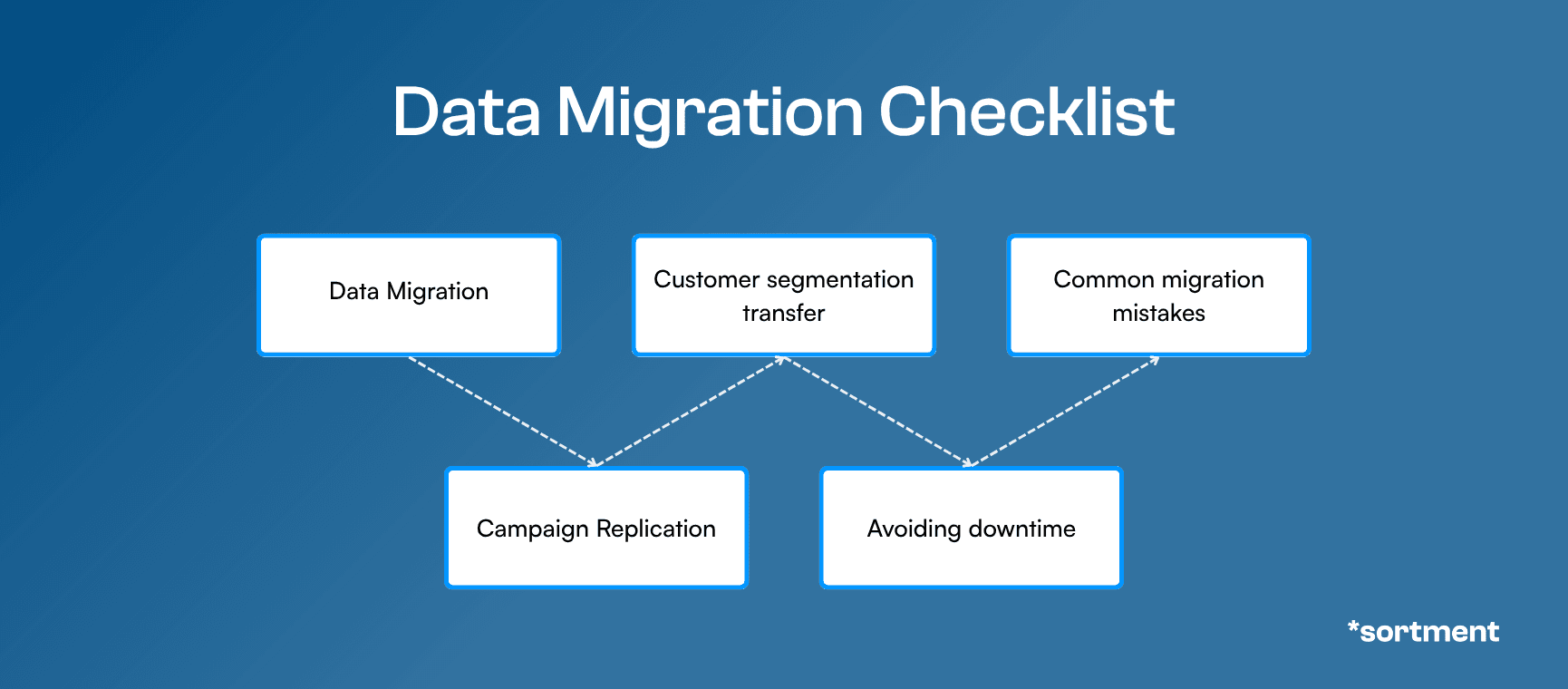
Figure: Step-by-step migration checklist for Hubspot
Data Migration. Export your full contact database, including custom properties, lifecycle stages, lead scores, and engagement history. HubSpot allows bulk CSV export of contacts, companies, deals, and tickets. Map each property to the equivalent field in your new platform before importing. Pay attention to date formats, multi-select fields, and any calculated properties that will not transfer directly.
Campaign Replication. Document every active workflow, sequence, and automated email before switching. Include enrollment triggers, re-enrollment rules, branching logic, email content, and send schedules. Screenshot complex workflows. Most platforms cannot import HubSpot workflows directly, so you will need to rebuild them, but having the logic mapped saves significant time.
Customer Segmentation Transfer. Export your active lists and smart lists with their filter criteria. HubSpot's list logic often depends on custom properties, form submissions, and lifecycle stages that may not have direct equivalents in your new platform. Rebuild segments using the new platform's segmentation model and validate counts against your HubSpot exports before going live.
Avoiding Downtime. Run both platforms in parallel for at least two weeks. Send from the new platform to a small test segment first, then gradually shift volume. Keep HubSpot active for any workflows tied to sales handoff, deal pipeline, or support ticket routing until those processes are fully migrated. If HubSpot is also your CRM, you may keep it for sales while moving marketing to the new platform.
Common Migration Mistakes. The most common HubSpot migration mistake is underestimating CRM dependency. Forms, landing pages, ad audiences, attribution models, and sales notifications may all be connected to HubSpot's CRM layer. Moving email alone is straightforward. Moving the full marketing function requires an audit of every integration, webhook, and workflow that touches HubSpot before you deactivate anything.
For the broader framework behind lifecycle marketing — what it is, how to structure it, and what campaigns actually move retention — the customer lifecycle marketing guide covers the full playbook.
Still Not Sure Which HubSpot Alternative Fits You?
The best way to decide is to test one. Most of the platforms listed here offer free trials or pilot programs. If you want to see how an AI-native approach compares to HubSpot's CRM-centric model on your actual data and campaigns, Sortment offers a 30-day proof of concept tied to a specific outcome your team defines. Book a call and bring your current HubSpot setup.
See what Sortment can do for your brand
See what Sortment can do for your brand
See what Sortment can do for your brand
Frequently Asked Questions About HubSpot Alternatives for Email Marketing
Why do teams switch from HubSpot for email marketing?
The most common reasons are contact-based pricing that scales faster than value, feature gating behind Professional ($890/month) and Enterprise ($3,600/month) tiers, limited native channels (no push or in-app), and reporting gaps around cohort analysis and cross-object visibility. Teams whose email needs grow beyond CRM-triggered nurture often find dedicated lifecycle platforms more capable and more cost-effective.
Is HubSpot good for email marketing?
HubSpot is effective for CRM-connected B2B email nurture, especially for inbound teams using forms, lead scoring, and sales handoff. It becomes less effective when campaigns need behavioral triggers from product data, native mobile channels, or lifecycle analytics beyond campaign-level opens and clicks. The email builder is easy to use, but the automation and reporting depth require expensive tier upgrades.
What is the cheapest HubSpot alternative for email?
Mailchimp offers a free tier for up to 500 contacts and paid plans starting well below HubSpot. ActiveCampaign starts around $49/month for small lists with automation that competes with HubSpot Professional. Both are significantly cheaper than HubSpot for teams whose primary need is email automation rather than a full CRM suite.
Can I use HubSpot as my CRM and another tool for email?
Yes, and many teams do exactly that. Keeping HubSpot for CRM, pipeline, and sales workflows while using a dedicated platform for marketing email and lifecycle campaigns is a common setup. Customer.io, Sortment, and ActiveCampaign all integrate with HubSpot's CRM. This approach lets you keep the CRM value without paying HubSpot's marketing contacts pricing for your full database.
Which HubSpot alternative is best for e-commerce?
Klaviyo is built specifically for e-commerce with native Shopify integrations, purchase-event triggers, and revenue-per-email reporting. It is the most common choice for DTC and e-commerce brands that outgrow HubSpot's email tools. For broader lifecycle needs beyond transactions, Customer.io and Sortment both support e-commerce use cases with deeper behavioral triggers.
Do HubSpot alternatives support push notifications and in-app messaging?
Customer.io, Braze, Iterable, and Sortment all support native push and in-app messaging. HubSpot does not natively support either channel and relies on third-party integrations like OneSignal for push. If your lifecycle campaigns need to reach users inside a mobile app, a dedicated engagement platform is a better fit than HubSpot with add-ons.
How hard is it to migrate from HubSpot?
The difficulty depends on how deeply HubSpot is integrated into your operations. If you use HubSpot only for email, migration is straightforward: export contacts, rebuild workflows, and switch. If HubSpot is also your CRM with forms, landing pages, lead scoring, and sales workflows connected to it, the migration requires more planning. Running both systems in parallel for two weeks and auditing all HubSpot-dependent processes before switching is the safest approach.
See also
Sortment vs Mixpanel: Which Platform is Better for Lifecycle Marketing?
Sortment vs Mixpanel: Which Platform is Better for Lifecycle Marketing?
Sortment vs Mixpanel: Which Platform is Better for Lifecycle Marketing?
Compare Sortment vs Mixpanel for lifecycle marketing. Discover differences in analytics, engagement, automation, and retention to choose the right customer engagement platform for your business.
Compare Sortment vs Mixpanel for lifecycle marketing. Discover differences in analytics, engagement, automation, and retention to choose the right customer engagement platform for your business.
See what Sortment can do for your goals.
See what Sortment can do for your goals.
Book a 30-minute call. We'll show you how the pilot works with your data and your stack.
Book a 30-minute call. We'll show you how the pilot works with your data and your stack.
AGENTS
CASE STUDIES
RESOURCES
AGENTS
CASE STUDIES
RESOURCES
Most teams searching for HubSpot alternatives for email marketing have already hit one of three walls. The first is price: contact-based billing that scales faster than revenue. The second is depth: workflows that work for CRM-triggered nurture but fall short once lifecycle campaigns need behavioral triggers, native push, or in-app messaging. The third is visibility: reporting that covers opens and clicks but stops short of cohort analysis, funnel breakdowns, or cross-campaign trends.
HubSpot is a strong CRM. Its email tools are tightly integrated with sales, forms, and lead scoring. For B2B inbound teams running nurture sequences off form fills and pipeline stages, it works. But when email stops being a CRM feature and starts being a lifecycle system, the gaps become hard to work around.
This guide covers seven alternatives built for teams that need deeper automation, broader channel coverage, or more transparent pricing than HubSpot's Marketing Hub provides.
What Should You Look for in a HubSpot Alternative?
Five criteria separate a genuine HubSpot alternative from a tool that will create the same frustrations at a different price point.
Scalability
HubSpot's contact-based pricing means costs rise with your database, not just your sending volume. One G2 reviewer called it the "Contact Tier Pricing Trap." A real alternative should scale on usage or sends, not penalize you for having a large audience you message selectively.
Omnichannel Capabilities
HubSpot natively supports email, ads, social, web, and chat. It does not natively support push notifications or in-app messaging, and SMS is a paid add-on limited to US numbers. If your lifecycle campaigns need to reach users inside a mobile app or across WhatsApp, push, and SMS globally, your alternative needs native support for those channels.
Ease of Use
HubSpot's email builder is praised for simplicity, but its workflow builder gets harder to manage as automation scales. Reviewers report debugging broken workflows is "more painful than it needs to be." The alternative should let your team build and maintain complex campaigns without engineering support or spreadsheet workarounds.
Analytics Depth
HubSpot has funnel reports, attribution, and custom dashboards. But cohort analysis is a known gap, customer journey analytics is Enterprise-only, and a six-year user reported still needing spreadsheets for cross-object reporting. The alternative should give your team funnel, cohort, and campaign-level visibility without a separate BI tool.
AI Capabilities
HubSpot's Breeze AI generates email drafts, subject lines, and workflow scaffolds. These are assistive features. They help with content creation but do not identify which campaigns to run, which cohorts need attention, or what is underperforming. A meaningful alternative should use AI to inform strategy, not only speed up execution.
Figure: Evaluation criteria for choosing a HubSpot alternative
What Are the Best HubSpot Alternatives for Email Marketing in 2026?
These seven platforms each solve a different part of the problem that drives teams away from HubSpot's email tools. The comparison table below shows where each one fits.
Platform | Best For | Why It Stands Out | When to Choose |
Sortment | Teams that need strategy + execution without a separate analytics stack | AI agents identify opportunities, build audiences, and run campaigns from your warehouse | You want one platform for lifecycle intelligence and execution, with a 30-day POC |
Customer.io | Product-led teams with behavioral messaging needs | Real-time event triggers across email, SMS, push, and in-app | You need granular behavioral automation tied to product events |
ActiveCampaign | SMBs moving beyond basic email into CRM-connected automation | Deep automation builder at a fraction of HubSpot's price | You want strong automation without enterprise pricing |
Klaviyo | E-commerce brands with revenue attribution needs | Built around purchase data, cart events, and revenue-per-email metrics | Your lifecycle revolves around transactions and catalog data |
Iterable | Enterprise teams with dedicated lifecycle functions | Visual journey builder with cross-channel orchestration at scale | You have the team and infrastructure to operate a dedicated CEP |
Braze | Mobile-first companies with high-frequency engagement | Real-time data streaming with native push, in-app, and Content Cards | Your product is a mobile app and engagement is session-driven |
Mailchimp | Small teams that need affordable, simple email | Easy setup, generous free tier, basic automation | You need newsletters and simple sequences without complexity |
Table: Best HubSpot alternatives for email marketing
1. Sortment
Sortment is an AI-native lifecycle marketing platform built for teams that want the platform itself to identify what campaigns to run, not just execute what the team has already decided.
When to choose Sortment over HubSpot:
Your marketing team spends more time figuring out what to run than actually running it
You want lifecycle analytics (funnels, cohorts, sessions) in the same product where campaigns are built
You want to test the platform against a specific outcome before signing an annual contract
What actually stands out:
Sortment connects to your data warehouse and uses AI agents to analyze behavioral data, surface underperforming cohorts, and recommend specific campaigns. The data agent builds audiences from natural language descriptions. The content agent writes copy. The QA agent validates before every send. The background agent monitors active campaigns and flags anomalies without anyone asking. Your team reviews and approves rather than configuring from scratch. Entry is a 30-day proof of concept tied to one metric you define: retention, activation, or conversion.
Best for: Subscription products, PLG teams, mobile apps, and high-frequency engagement contexts where knowing what to run next matters as much as running it.
“I feel like I'm able to, in 20% of my time, execute on what normally a team of three to five full time lifecycle marketers would do — without needing engineering, data or shared resources.”
Drew Price, VP, Growth Marketing, BryteBridge Group
“I feel like I'm able to, in 20% of my time, execute on what normally a team of three to five full time lifecycle marketers would do — without needing engineering, data or shared resources.”
Drew Price, VP, Growth Marketing, BryteBridge Group
“I feel like I'm able to, in 20% of my time, execute on what normally a team of three to five full time lifecycle marketers would do — without needing engineering, data or shared resources.”
Drew Price, VP, Growth Marketing, BryteBridge Group
2. Customer.io
Customer.io is a messaging platform built for product-led and developer-friendly teams that need campaigns triggered by real-time behavioral events.
When to choose Customer.io over HubSpot:
Your campaigns need to fire on product events (feature used, milestone hit, plan upgraded), not just CRM field changes
You need native push and in-app alongside email and SMS
What actually stands out:
Customer.io's event-driven architecture means campaigns respond to what users do inside your product in real time. Journeys support email, SMS, push, and in-app natively. The workflow builder is code-optional but powerful enough for engineering teams to extend with liquid logic and webhooks. Pricing is based on profiles, not contacts-you-might-email, which scales more predictably than HubSpot's marketing contacts model.
Best for: SaaS and app teams with product-led growth motions where activation and retention depend on in-product behavior.
3. ActiveCampaign
ActiveCampaign combines email marketing, automation, and a lightweight CRM at a price point well below HubSpot's Marketing Hub Professional.
When to choose ActiveCampaign over HubSpot:
You want deep automation without paying $890/month for HubSpot Professional
You need CRM-connected email campaigns but not the full HubSpot ecosystem
What actually stands out:
ActiveCampaign's automation builder supports conditional branching, lead scoring, site tracking, and multi-step sequences at its Plus tier, around $49/month for small lists. That puts it in direct competition with HubSpot Professional's automation, which starts at $890/month. The tradeoff is that ActiveCampaign's CRM is lighter, its reporting is shallower, and it lacks HubSpot's sales and service hub ecosystem. For teams whose primary need is email automation rather than a full revenue operations suite, the economics are hard to argue with.
Best for: SMBs and mid-market teams that need marketing automation and CRM without enterprise pricing.
4. Klaviyo
Klaviyo is an email and SMS platform built specifically for e-commerce, with deep integrations into Shopify, WooCommerce, BigCommerce, and other storefront platforms.
When to choose Klaviyo over HubSpot:
Your lifecycle campaigns are driven by purchase events, cart abandonment, and product browsing data
You need revenue attribution tied directly to email and SMS sends
What actually stands out:
Klaviyo's data model is structured around transactions. Flows trigger on purchase, cart, browse, and catalog events natively. Revenue-per-email reporting is a default view, not a custom report. The platform also includes predictive analytics for customer lifetime value and churn risk at the cohort level. For e-commerce teams, this is a more natural fit than building product-event workflows inside HubSpot's CRM-centric automation. Pricing is contact-based but starts lower than HubSpot Professional, and the e-commerce integrations require less setup.
Best for: E-commerce brands on Shopify or similar platforms where purchase data drives the lifecycle.
5. Iterable
Iterable is an enterprise cross-channel customer engagement platform built for teams with dedicated lifecycle functions and existing analytics infrastructure.
When to choose Iterable over HubSpot:
You need journey orchestration across email, push, SMS, in-app, web, and WhatsApp at enterprise scale
Your team has the engineering resources and BI tooling to support a dedicated CEP
What actually stands out:
Iterable's journey builder handles complex multi-step flows with branching, entry conditions, exit rules, and A/B testing across all supported channels. Its channel breadth is wider than HubSpot's native set: email, push, SMS, in-app, web push, and WhatsApp are all configurable inside journeys. Nova AI handles send time optimization and channel selection. The tradeoff is cost (median annual contracts around $32,000 per third-party data), quote-based pricing, and a reliance on external analytics tools for org-wide reporting. For teams comparing options in this tier, see our breakdown of Braze alternatives.
Best for: Large B2C operations with mature lifecycle teams and existing data infrastructure.
6. Braze
Braze is a customer engagement platform built for mobile-first companies that need real-time messaging tied to in-product behavior.
When to choose Braze over HubSpot:
Your product is a mobile app and your campaigns depend on session data, feature usage, and in-app events
You need native push, in-app messages, and Content Cards alongside email and SMS
What actually stands out:
Braze processes behavioral data in real time and supports email, SMS/MMS/RCS, push, in-app, Content Cards, banners, webhooks, and WhatsApp inside its Canvas journey builder. That channel depth is significantly wider than HubSpot's native set. The platform is designed for high-frequency engagement patterns where message timing and in-session context matter. Pricing is enterprise-level, and implementation is substantial. But for mobile-first companies, the gap between HubSpot's CRM-centric model and Braze's product-behavior model is large enough that supplementing HubSpot with integrations is often harder than switching.
Best for: Mobile apps, gaming, media, and fintech with high-frequency product engagement.
7. Mailchimp
Mailchimp is an email marketing platform built for small businesses and teams that need simple, affordable campaigns without complex automation.
When to choose Mailchimp over HubSpot:
You need to send newsletters, announcements, and basic automations at low cost
You want to get started quickly without onboarding fees or annual contracts
What actually stands out:
Mailchimp's free tier supports up to 500 contacts with basic email and landing pages. Its paid plans start well below HubSpot's Starter and include a drag-and-drop builder, basic automation, and audience segmentation. The platform is not built for complex lifecycle orchestration, behavioral triggers, or multi-channel messaging. But for teams whose primary need is email, Mailchimp does it affordably and with minimal setup. It is also the most common platform teams use before they outgrow it and move to something with deeper automation.
Best for: Small businesses and early-stage teams that need email campaigns without complexity or high cost.
Which HubSpot Alternative Is Best for Your Use Case?
The right alternative depends on what specifically is not working about HubSpot for your team.
If your frustration is pricing, ActiveCampaign gives you comparable automation at a fraction of the cost. Mailchimp is even cheaper for basic email.
If you need behavioral triggers from product data, not just CRM field changes, Customer.io or Braze are built for that. Customer.io is the more accessible option for mid-market teams. Braze is the enterprise-grade choice for mobile-first products.
If you need lifecycle strategy and execution in one platform without building a separate analytics stack around it, Sortment handles both. A DTC personal care brand saw a 23% increase in CTR after its AI identified audience segments the team had not previously targeted. The gain came from targeting the right segments, not from running more campaigns.
If your lifecycle is transaction-driven, Klaviyo's e-commerce data model is a more natural fit than HubSpot's CRM-centric approach.
If you need enterprise-scale journey orchestration with deep cross-channel support, Iterable is the dedicated option. For a deeper comparison of platforms in this category, see our guide to the best customer engagement platforms.
How to Migrate from HubSpot Without Losing Data or Campaigns
Migrating from HubSpot takes more planning than switching a typical ESP because HubSpot often functions as both your CRM and your marketing platform. The shared database is what makes HubSpot convenient, and it is also what makes leaving it complex.
Figure: Step-by-step migration checklist for Hubspot
Data Migration. Export your full contact database, including custom properties, lifecycle stages, lead scores, and engagement history. HubSpot allows bulk CSV export of contacts, companies, deals, and tickets. Map each property to the equivalent field in your new platform before importing. Pay attention to date formats, multi-select fields, and any calculated properties that will not transfer directly.
Campaign Replication. Document every active workflow, sequence, and automated email before switching. Include enrollment triggers, re-enrollment rules, branching logic, email content, and send schedules. Screenshot complex workflows. Most platforms cannot import HubSpot workflows directly, so you will need to rebuild them, but having the logic mapped saves significant time.
Customer Segmentation Transfer. Export your active lists and smart lists with their filter criteria. HubSpot's list logic often depends on custom properties, form submissions, and lifecycle stages that may not have direct equivalents in your new platform. Rebuild segments using the new platform's segmentation model and validate counts against your HubSpot exports before going live.
Avoiding Downtime. Run both platforms in parallel for at least two weeks. Send from the new platform to a small test segment first, then gradually shift volume. Keep HubSpot active for any workflows tied to sales handoff, deal pipeline, or support ticket routing until those processes are fully migrated. If HubSpot is also your CRM, you may keep it for sales while moving marketing to the new platform.
Common Migration Mistakes. The most common HubSpot migration mistake is underestimating CRM dependency. Forms, landing pages, ad audiences, attribution models, and sales notifications may all be connected to HubSpot's CRM layer. Moving email alone is straightforward. Moving the full marketing function requires an audit of every integration, webhook, and workflow that touches HubSpot before you deactivate anything.
For the broader framework behind lifecycle marketing — what it is, how to structure it, and what campaigns actually move retention — the customer lifecycle marketing guide covers the full playbook.
Still Not Sure Which HubSpot Alternative Fits You?
The best way to decide is to test one. Most of the platforms listed here offer free trials or pilot programs. If you want to see how an AI-native approach compares to HubSpot's CRM-centric model on your actual data and campaigns, Sortment offers a 30-day proof of concept tied to a specific outcome your team defines. Book a call and bring your current HubSpot setup.
See what Sortment can do for your brand
See what Sortment can do for your brand
See what Sortment can do for your brand
Frequently Asked Questions About HubSpot Alternatives for Email Marketing
Why do teams switch from HubSpot for email marketing?
The most common reasons are contact-based pricing that scales faster than value, feature gating behind Professional ($890/month) and Enterprise ($3,600/month) tiers, limited native channels (no push or in-app), and reporting gaps around cohort analysis and cross-object visibility. Teams whose email needs grow beyond CRM-triggered nurture often find dedicated lifecycle platforms more capable and more cost-effective.
Is HubSpot good for email marketing?
HubSpot is effective for CRM-connected B2B email nurture, especially for inbound teams using forms, lead scoring, and sales handoff. It becomes less effective when campaigns need behavioral triggers from product data, native mobile channels, or lifecycle analytics beyond campaign-level opens and clicks. The email builder is easy to use, but the automation and reporting depth require expensive tier upgrades.
What is the cheapest HubSpot alternative for email?
Mailchimp offers a free tier for up to 500 contacts and paid plans starting well below HubSpot. ActiveCampaign starts around $49/month for small lists with automation that competes with HubSpot Professional. Both are significantly cheaper than HubSpot for teams whose primary need is email automation rather than a full CRM suite.
Can I use HubSpot as my CRM and another tool for email?
Yes, and many teams do exactly that. Keeping HubSpot for CRM, pipeline, and sales workflows while using a dedicated platform for marketing email and lifecycle campaigns is a common setup. Customer.io, Sortment, and ActiveCampaign all integrate with HubSpot's CRM. This approach lets you keep the CRM value without paying HubSpot's marketing contacts pricing for your full database.
Which HubSpot alternative is best for e-commerce?
Klaviyo is built specifically for e-commerce with native Shopify integrations, purchase-event triggers, and revenue-per-email reporting. It is the most common choice for DTC and e-commerce brands that outgrow HubSpot's email tools. For broader lifecycle needs beyond transactions, Customer.io and Sortment both support e-commerce use cases with deeper behavioral triggers.
Do HubSpot alternatives support push notifications and in-app messaging?
Customer.io, Braze, Iterable, and Sortment all support native push and in-app messaging. HubSpot does not natively support either channel and relies on third-party integrations like OneSignal for push. If your lifecycle campaigns need to reach users inside a mobile app, a dedicated engagement platform is a better fit than HubSpot with add-ons.
How hard is it to migrate from HubSpot?
The difficulty depends on how deeply HubSpot is integrated into your operations. If you use HubSpot only for email, migration is straightforward: export contacts, rebuild workflows, and switch. If HubSpot is also your CRM with forms, landing pages, lead scoring, and sales workflows connected to it, the migration requires more planning. Running both systems in parallel for two weeks and auditing all HubSpot-dependent processes before switching is the safest approach.