Why Frequency Capping Silently Reduces Your Email Campaign Reach
Frequency caps in lifecycle and email marketing silently suppress your most engaged users — and standard reports won't show it. Here's how it happens and how to find it before it costs you weeks of reach.
Abhimanyu
·
New York
·
Most teams set frequency caps once and never look at them again. It's a hygiene setting — configure it at setup, protect sender reputation, move on. The problem is that in lifecycle and email marketing, that default behavior quietly eats your reach. And your standard reports will never tell you.
What a frequency cap actually does
A frequency cap is simple: don't send a user more than X messages in Y days. It keeps users from feeling bombarded and protects your sender reputation. Fine. Good even.
The problem isn't the cap. It's what happens when the cap meets your audience.
The invisible exclusion
Frequency caps don't operate in a vacuum. They run across your entire campaign stack. As you add more campaigns, more lifecycle flows, more triggers, the same users start qualifying for multiple sends at once.
The cap doesn't care which campaign matters more. It just counts.
Say a user gets a re-engagement email Monday, a promotional send Tuesday, a product update Wednesday. Your cap is 3 per week.That user is now invisible to everything else.
They qualify for Thursday's nurture sequence. They're in the segment. The campaign fires. The cap blocks it. Nothing goes out. No error. No alert. The dashboard says the campaign ran.
Most lifecycle platforms handle this the same way: users who hit the cap don't generate a send event at all. They just fall off quietly.
Unless you're actively looking for suppressed sends in your data stream or audit logs, the reporting surface you check every day — open rates, click rates, send counts — won't show you any of this.





How audience definitions make it worse
Most teams build segments on behavior: "users who visited the pricing page," "users who opened in the last 30 days," "users in an active trial." These segments overlap more than you'd expect.
A user in your trial nurture flow can also be in your feature announcement segment and your onboarding sequence at the same time.
Each campaign applies the cap independently. But the cap is cumulative.
So the users at the center of your audience overlap — your most engaged, highest-intent users — qualify for the most campaigns. They hit the cap first. They're the first to stop getting your messages.
You are structurally suppressing your best users.
Engagement tier | Campaigns qualified/wk (avg) | Likelihood of hitting cap | Effective reach loss |
|---|---|---|---|
High (opens 3+/wk) | 5–7 | Very high | 40–60% |
Mid (opens 1–2/wk) | 2–4 | Moderate | 15–30% |
Low (rarely opens) | 0–1 | Low | <5% |
Table: The users you most want to reach are the ones most likely to get capped.
Why the reports look fine
Campaign dashboards tell you what happened to the sends that went out. Not why a send didn't happen. Open rates, click rates, conversions: all calculated on messages that actually delivered. Capped users never enter the denominator.
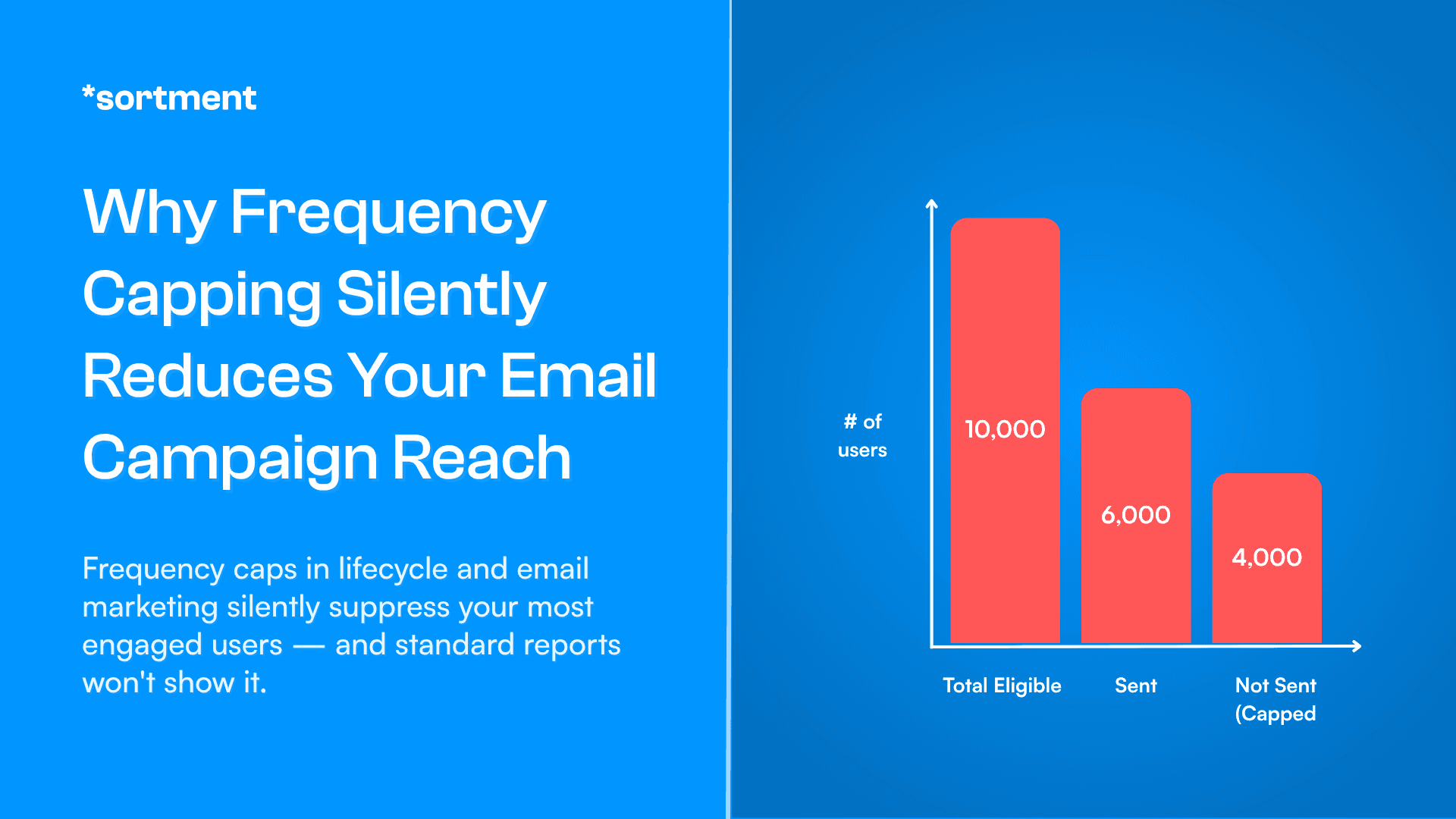
A campaign that should have reached 10,000 users but only reached 6,000 because 4,000 were capped will show you metrics for 6,000 users. The open rate looks normal. The CTR looks healthy. You have no idea 40% of your intended audience didn't get the message.
This is why it doesn't get caught. Everything looks fine. The campaign ran. Numbers came back. Life moves on.
Reach loss only becomes obvious when list engagement starts declining over weeks, or when a big campaign underperforms relative to audience size. And even then, the instinct is to blame the creative or the offer — not the infrastructure.
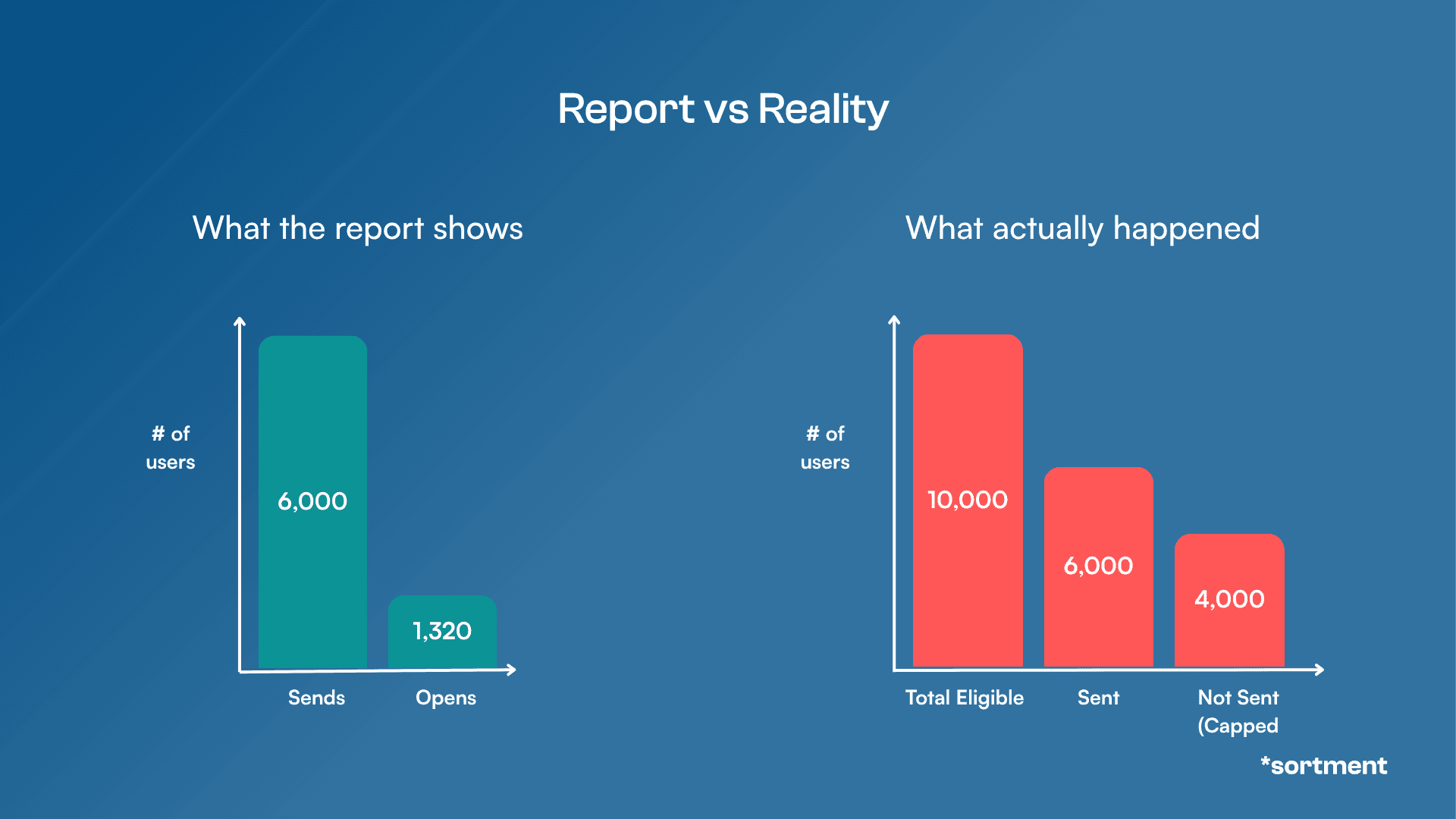
Figure: How frequency capping silently reduces your reach
A pattern that comes up more than you'd think
One team running lifecycle marketing across multiple product lines had frequency caps set at the account level — 4 messages per user per week, which is reasonable. Campaigns ran cleanly. Deliverability was solid. Metrics looked acceptable.
What nobody had tracked was how many campaigns had been added over the previous six months. A new onboarding flow. A trial expiry sequence. A product newsletter. A re-engagement drip. None of them felt like much on their own.
Together, they meant a large share of their most active users were hitting the cap by Wednesday every week and sitting in a send blackout Thursday through Sunday.
By the time they dug into it, Thursday and Friday sends had lost nearly half their effective reach compared to the same campaigns six months earlier. The cap hadn't changed. The audience hadn't shrunk. The campaigns just kept accumulating.
Finding the problem took weeks. The fix took a day.
“I feel like I'm able to, in 20% of my time, execute on what normally a team of three to five full time lifecycle marketers would do — without needing engineering, data or shared resources.”
Drew Price, VP, Growth Marketing, BryteBridge Group
“I feel like I'm able to, in 20% of my time, execute on what normally a team of three to five full time lifecycle marketers would do — without needing engineering, data or shared resources.”
Drew Price, VP, Growth Marketing, BryteBridge Group
“I feel like I'm able to, in 20% of my time, execute on what normally a team of three to five full time lifecycle marketers would do — without needing engineering, data or shared resources.”
Drew Price, VP, Growth Marketing, BryteBridge Group
Three checks that will tell you if you have this problem
Start with the most obvious signal most teams never look at: the gap between qualified audience size and actual send count. Not just for big campaigns — all of them. A consistent 15–30% gap across campaigns isn't a targeting issue. It's a cap issue.
From there, find where your platform records silently-capped users — most tools log this somewhere, though it's rarely surfaced in standard dashboards. Build a weekly view. If you can't find that data at all, that's its own red flag.
Then map your active campaigns against their combined weekly send pressure on core segments. Take your five most important audience segments, list every active campaign targeting them, count the combined maximum weekly sends, and compare to your cap.
If the theoretical maximum exceeds the cap — which it usually does — some users in those segments are guaranteed to miss sends every week.
What actually fixes it
The mechanics are straightforward once you find it: raise the cap, trim concurrent flows targeting the same segments, or introduce priority rules so your highest-value campaigns always take the send slot and lower-priority ones yield.
But the root cause is usually architectural. Per-campaign caps are the wrong unit of control when users are simultaneously enrolled in five journeys.
What you actually need is cross-campaign frequency management, a single rule that governs how often a user can be contacted across your entire lifecycle stack, not just within one flow.
That's what Sortment handles natively.
What one marketer built in a year
BryteBridge scaled a new brand from 2 states to 20 with one lifecycle marketer, no data engineering team, and Sortment.
10x
Revenue, year-over-year
2,000+
Campaigns shipped in 12 months
1
Marketer. No engineers.
What one marketer built in a year
BryteBridge scaled a new brand from 2 states to 20 with one lifecycle marketer, no data engineering team, and Sortment.
10x
Revenue, year-over-year
2,000+
Campaigns shipped in 12 months
1
Marketer. No engineers.
What one marketer built in a year
BryteBridge scaled a new brand from 2 states to 20 with one lifecycle marketer, no data engineering team, and Sortment.
10x
Revenue, year-over-year
2,000+
Campaigns shipped in 12 months
1
Marketer. No engineers.
Cross-campaign frequency rules sit above individual journeys, so a user's weekly contact budget is shared across everything targeting them, onboarding, re-engagement, promotional, product, not re-counted fresh in each campaign.
Combined with Dynamic Traits that track user state across journeys (so a user already mid-sequence in one flow can be automatically excluded from overlapping ones), and audience overlap analysis that makes qualification gaps visible rather than buried in logs, it changes the default from "suppression happens and you find out later" to "suppression is prevented at the point of audience definition."
Most teams don't need to audit this problem if the infrastructure doesn't create it in the first place.
And for the cases where something does slip through — a new flow gets added, a segment grows unexpectedly, caps get hit in ways nobody anticipated — Sortment's Background Agents catch it before it compounds.
The system monitors campaign performance against your baselines every day and flags when something looks off: a send count that's lower than expected, an open rate that spikes because a suppressed segment suddenly got excluded. You don't have to go looking for the problem. It surfaces it.
The question worth asking now
The one thing most teams never check: who qualified for this campaign but didn't receive it?
Not after a campaign underperforms. Now, for whatever went out last week. The gap between those two numbers tells you more about your lifecycle health than open rate does.
It's a one-line query. It's also the only way to see this problem before it compounds.
See what Sortment can do in 30 days
Pick one lifecycle goal, like activation, retention, or monetization and see how Sortment can achieves your business goals.
See what Sortment can do in 30 days
Pick one lifecycle goal, like activation, retention, or monetization and see how Sortment can achieves your business goals.
See what Sortment can do in 30 days
Pick one lifecycle goal, like activation, retention, or monetization and see how Sortment can achieves your business goals.
FAQ: Frequency capping and email campaign reach
What is frequency capping in email and lifecycle marketing?
Frequency capping is a rule that limits how many times a single user can be contacted within a set time period — for example, no more than 3 emails per user per week. It's designed to prevent over-messaging, reduce unsubscribes, and protect sender reputation.
Why is frequency capping a problem if it's meant to protect users?
The cap itself isn't the problem. The problem is that most platforms apply the cap cumulatively across all campaigns, but report on each campaign individually. So a user can be silently blocked from receiving your message — no error, no alert — while your dashboard still shows the campaign as completed. The reach loss is real; the reporting just doesn't show it.
How do I know if frequency capping is reducing my campaign reach?
Three signals to check:
A consistent gap between your qualified audience size and actual send count across campaigns
Frequency capped event counts in your platform's suppression logs or data stream
A mapping of how many campaigns target your core segments simultaneously — if the combined weekly send maximum exceeds your cap, some users are guaranteed to miss sends every week
Which users are most affected by frequency cap suppression?
High-engagement users — those who open frequently and qualify for multiple segments — are affected most. Because they meet the criteria for more campaigns, they hit the contact limit faster than low-engagement users. Ironically, the users least affected by suppression are the ones least likely to convert.
How does Sortment handle frequency capping differently?
Sortment applies frequency rules at the cross-campaign level, so a user's weekly contact budget is shared across all journeys targeting them — not silently reset with each new campaign.
Dynamic Traits track user state across journeys, enabling automatic exclusions when someone is already mid-sequence in another flow.
Audience overlap analysis surfaces qualification gaps before campaigns run, and daily anomaly alerts flag unusual send patterns — like a lower-than-expected send count — so suppression issues are caught early rather than discovered weeks later.
What's the fastest way to check for frequency cap suppression right now?
Pull the qualified audience size versus actual send count for your last five campaigns. If you see a consistent gap of 15–30% or more, you likely have a cap issue. From there, check your platform's suppression or frequency capped event logs to confirm.
See also
Lifecycle Marketing Data Dependency: How to Fix It
Lifecycle Marketing Data Dependency: How to Fix It
Lifecycle Marketing Data Dependency: How to Fix It
2 in 5 lifecycle teams manually export audience lists by hand. 1 in 2 can't build a segment without a data team queue. Here's why it happens and how to fix it.
2 in 5 lifecycle teams manually export audience lists by hand. 1 in 2 can't build a segment without a data team queue. Here's why it happens and how to fix it.
See what Sortment can do for your goals.
See what Sortment can do for your goals.
Book a 30-minute call. We'll show you how the pilot works with your data and your stack.
Book a 30-minute call. We'll show you how the pilot works with your data and your stack.
AGENTS
CASE STUDIES
RESOURCES
AGENTS
CASE STUDIES
RESOURCES
Most teams set frequency caps once and never look at them again. It's a hygiene setting — configure it at setup, protect sender reputation, move on. The problem is that in lifecycle and email marketing, that default behavior quietly eats your reach. And your standard reports will never tell you.
What a frequency cap actually does
A frequency cap is simple: don't send a user more than X messages in Y days. It keeps users from feeling bombarded and protects your sender reputation. Fine. Good even.
The problem isn't the cap. It's what happens when the cap meets your audience.
The invisible exclusion
Frequency caps don't operate in a vacuum. They run across your entire campaign stack. As you add more campaigns, more lifecycle flows, more triggers, the same users start qualifying for multiple sends at once.
The cap doesn't care which campaign matters more. It just counts.
Say a user gets a re-engagement email Monday, a promotional send Tuesday, a product update Wednesday. Your cap is 3 per week.That user is now invisible to everything else.
They qualify for Thursday's nurture sequence. They're in the segment. The campaign fires. The cap blocks it. Nothing goes out. No error. No alert. The dashboard says the campaign ran.
Most lifecycle platforms handle this the same way: users who hit the cap don't generate a send event at all. They just fall off quietly.
Unless you're actively looking for suppressed sends in your data stream or audit logs, the reporting surface you check every day — open rates, click rates, send counts — won't show you any of this.
How audience definitions make it worse
Most teams build segments on behavior: "users who visited the pricing page," "users who opened in the last 30 days," "users in an active trial." These segments overlap more than you'd expect.
A user in your trial nurture flow can also be in your feature announcement segment and your onboarding sequence at the same time.
Each campaign applies the cap independently. But the cap is cumulative.
So the users at the center of your audience overlap — your most engaged, highest-intent users — qualify for the most campaigns. They hit the cap first. They're the first to stop getting your messages.
You are structurally suppressing your best users.
Engagement tier | Campaigns qualified/wk (avg) | Likelihood of hitting cap | Effective reach loss |
|---|---|---|---|
High (opens 3+/wk) | 5–7 | Very high | 40–60% |
Mid (opens 1–2/wk) | 2–4 | Moderate | 15–30% |
Low (rarely opens) | 0–1 | Low | <5% |
Table: The users you most want to reach are the ones most likely to get capped.
Why the reports look fine
Campaign dashboards tell you what happened to the sends that went out. Not why a send didn't happen. Open rates, click rates, conversions: all calculated on messages that actually delivered. Capped users never enter the denominator.
A campaign that should have reached 10,000 users but only reached 6,000 because 4,000 were capped will show you metrics for 6,000 users. The open rate looks normal. The CTR looks healthy. You have no idea 40% of your intended audience didn't get the message.
This is why it doesn't get caught. Everything looks fine. The campaign ran. Numbers came back. Life moves on.
Reach loss only becomes obvious when list engagement starts declining over weeks, or when a big campaign underperforms relative to audience size. And even then, the instinct is to blame the creative or the offer — not the infrastructure.
Figure: How frequency capping silently reduces your reach
A pattern that comes up more than you'd think
One team running lifecycle marketing across multiple product lines had frequency caps set at the account level — 4 messages per user per week, which is reasonable. Campaigns ran cleanly. Deliverability was solid. Metrics looked acceptable.
What nobody had tracked was how many campaigns had been added over the previous six months. A new onboarding flow. A trial expiry sequence. A product newsletter. A re-engagement drip. None of them felt like much on their own.
Together, they meant a large share of their most active users were hitting the cap by Wednesday every week and sitting in a send blackout Thursday through Sunday.
By the time they dug into it, Thursday and Friday sends had lost nearly half their effective reach compared to the same campaigns six months earlier. The cap hadn't changed. The audience hadn't shrunk. The campaigns just kept accumulating.
Finding the problem took weeks. The fix took a day.
“I feel like I'm able to, in 20% of my time, execute on what normally a team of three to five full time lifecycle marketers would do — without needing engineering, data or shared resources.”
Drew Price, VP, Growth Marketing, BryteBridge Group
“I feel like I'm able to, in 20% of my time, execute on what normally a team of three to five full time lifecycle marketers would do — without needing engineering, data or shared resources.”
Drew Price, VP, Growth Marketing, BryteBridge Group
“I feel like I'm able to, in 20% of my time, execute on what normally a team of three to five full time lifecycle marketers would do — without needing engineering, data or shared resources.”
Drew Price, VP, Growth Marketing, BryteBridge Group
Three checks that will tell you if you have this problem
Start with the most obvious signal most teams never look at: the gap between qualified audience size and actual send count. Not just for big campaigns — all of them. A consistent 15–30% gap across campaigns isn't a targeting issue. It's a cap issue.
From there, find where your platform records silently-capped users — most tools log this somewhere, though it's rarely surfaced in standard dashboards. Build a weekly view. If you can't find that data at all, that's its own red flag.
Then map your active campaigns against their combined weekly send pressure on core segments. Take your five most important audience segments, list every active campaign targeting them, count the combined maximum weekly sends, and compare to your cap.
If the theoretical maximum exceeds the cap — which it usually does — some users in those segments are guaranteed to miss sends every week.
What actually fixes it
The mechanics are straightforward once you find it: raise the cap, trim concurrent flows targeting the same segments, or introduce priority rules so your highest-value campaigns always take the send slot and lower-priority ones yield.
But the root cause is usually architectural. Per-campaign caps are the wrong unit of control when users are simultaneously enrolled in five journeys.
What you actually need is cross-campaign frequency management, a single rule that governs how often a user can be contacted across your entire lifecycle stack, not just within one flow.
That's what Sortment handles natively.
What one marketer built in a year
BryteBridge scaled a new brand from 2 states to 20 with one lifecycle marketer, no data engineering team, and Sortment.
10x
Revenue, year-over-year
2,000+
Campaigns shipped in 12 months
1
Marketer. No engineers.
What one marketer built in a year
BryteBridge scaled a new brand from 2 states to 20 with one lifecycle marketer, no data engineering team, and Sortment.
10x
Revenue, year-over-year
2,000+
Campaigns shipped in 12 months
1
Marketer. No engineers.
What one marketer built in a year
BryteBridge scaled a new brand from 2 states to 20 with one lifecycle marketer, no data engineering team, and Sortment.
10x
Revenue, year-over-year
2,000+
Campaigns shipped in 12 months
1
Marketer. No engineers.
Cross-campaign frequency rules sit above individual journeys, so a user's weekly contact budget is shared across everything targeting them, onboarding, re-engagement, promotional, product, not re-counted fresh in each campaign.
Combined with Dynamic Traits that track user state across journeys (so a user already mid-sequence in one flow can be automatically excluded from overlapping ones), and audience overlap analysis that makes qualification gaps visible rather than buried in logs, it changes the default from "suppression happens and you find out later" to "suppression is prevented at the point of audience definition."
Most teams don't need to audit this problem if the infrastructure doesn't create it in the first place.
And for the cases where something does slip through — a new flow gets added, a segment grows unexpectedly, caps get hit in ways nobody anticipated — Sortment's Background Agents catch it before it compounds.
The system monitors campaign performance against your baselines every day and flags when something looks off: a send count that's lower than expected, an open rate that spikes because a suppressed segment suddenly got excluded. You don't have to go looking for the problem. It surfaces it.
The question worth asking now
The one thing most teams never check: who qualified for this campaign but didn't receive it?
Not after a campaign underperforms. Now, for whatever went out last week. The gap between those two numbers tells you more about your lifecycle health than open rate does.
It's a one-line query. It's also the only way to see this problem before it compounds.
See what Sortment can do in 30 days
Pick one lifecycle goal, like activation, retention, or monetization and see how Sortment can achieves your business goals.
See what Sortment can do in 30 days
Pick one lifecycle goal, like activation, retention, or monetization and see how Sortment can achieves your business goals.
See what Sortment can do in 30 days
Pick one lifecycle goal, like activation, retention, or monetization and see how Sortment can achieves your business goals.
FAQ: Frequency capping and email campaign reach
What is frequency capping in email and lifecycle marketing?
Frequency capping is a rule that limits how many times a single user can be contacted within a set time period — for example, no more than 3 emails per user per week. It's designed to prevent over-messaging, reduce unsubscribes, and protect sender reputation.
Why is frequency capping a problem if it's meant to protect users?
The cap itself isn't the problem. The problem is that most platforms apply the cap cumulatively across all campaigns, but report on each campaign individually. So a user can be silently blocked from receiving your message — no error, no alert — while your dashboard still shows the campaign as completed. The reach loss is real; the reporting just doesn't show it.
How do I know if frequency capping is reducing my campaign reach?
Three signals to check:
A consistent gap between your qualified audience size and actual send count across campaigns
Frequency capped event counts in your platform's suppression logs or data stream
A mapping of how many campaigns target your core segments simultaneously — if the combined weekly send maximum exceeds your cap, some users are guaranteed to miss sends every week
Which users are most affected by frequency cap suppression?
High-engagement users — those who open frequently and qualify for multiple segments — are affected most. Because they meet the criteria for more campaigns, they hit the contact limit faster than low-engagement users. Ironically, the users least affected by suppression are the ones least likely to convert.
How does Sortment handle frequency capping differently?
Sortment applies frequency rules at the cross-campaign level, so a user's weekly contact budget is shared across all journeys targeting them — not silently reset with each new campaign.
Dynamic Traits track user state across journeys, enabling automatic exclusions when someone is already mid-sequence in another flow.
Audience overlap analysis surfaces qualification gaps before campaigns run, and daily anomaly alerts flag unusual send patterns — like a lower-than-expected send count — so suppression issues are caught early rather than discovered weeks later.
What's the fastest way to check for frequency cap suppression right now?
Pull the qualified audience size versus actual send count for your last five campaigns. If you see a consistent gap of 15–30% or more, you likely have a cap issue. From there, check your platform's suppression or frequency capped event logs to confirm.