How does Sortment work: AI Customer Engagement Platform Guide
Learn how Sortment's AI agents automate lifecycle marketing: strategy, content creation, and campaign execution. Set up in days with your existing data warehouse.
Priy Ranjan
·
New York
·
What is Sortment?
Sortment is an AI-native customer engagement platform that automates lifecycle marketing from strategy to execution. Think of it as "tool plus agency", where the agency work is done by AI agents instead of humans.
Unlike traditional customer engagement platforms (CEPs) that require large teams to operate effectively, Sortment enables a small team or individual + AI to deliver the same outcomes. Instead of spending weeks on setup, manual segmentation, content creation, and campaign execution, Sortment's AI agents handle the grunt work while your team focuses on strategy and approval.
The platform connects directly to your data warehouse (Snowflake, BigQuery, or Databricks), analyzes customer behavior, generates campaign strategies, creates content, and executes campaigns across email, push notifications, SMS, and in-app channels.
The Problem: Why Traditional Customer Engagement Platforms Fall Short
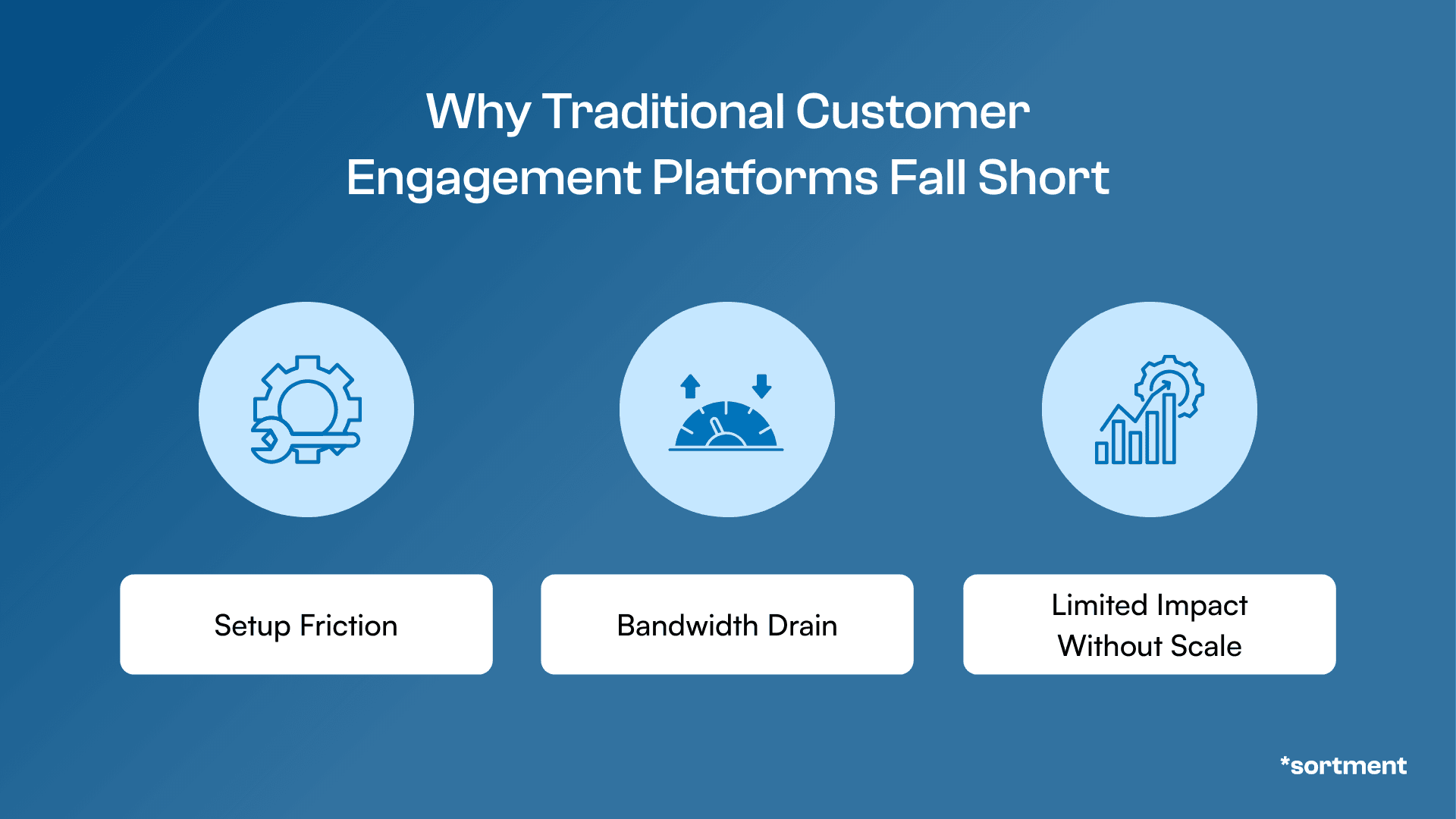
Figure: The problem with traditional customer engagement platforms
Before diving into how Sortment works, let's understand the problem it solves.
Setup Friction: Weeks of Engineering Time Just to Start
Traditional CEPs require extensive engineering work before you can send your first campaign. Every integration needs tickets, data mapping, and custom code. Data must be copied from your warehouse into the platform's database. By the time you're live, market conditions have changed.
One lifecycle marketing lead at a major fitness company described their challenge: "The primary bottleneck is execution bandwidth. We could be running hundreds of journeys with our existing data, but we've only created 3-10 because content creation and campaign setup take too long."



Bandwidth Drain: Campaign Creation Is 70% Grunt Work
Even after setup, running campaigns requires significant manual effort:
Data work: Creating segments, building audiences, writing SQL queries
Content creation: Designing emails, writing copy, creating variations for A/B tests
Campaign setup: Building workflows, setting up triggers, configuring journeys
Analysis: Pulling performance data, generating insights, identifying opportunities
A marketing operations director at a streaming company said it plainly: "We have only 3-10 journeys created versus hundreds possible with existing data. Content creation and campaign setup are taking too long, and we lack the technical capability on the CRM team."
Limited Impact Without Scale: You Can't Test What You Can't Build
The biggest opportunity cost isn't the time spent on execution — it's the experiments you never run. A/B tests take weeks to build. Personalization requires engineering resources. By the time you validate an idea, the opportunity is gone.
As one VP of Product at a hospitality startup explained: "We could fill weekday occupancies during lean periods, but we don't have the bandwidth to experiment fast enough to find what works."
How Sortment Works: The Three-Layer Architecture
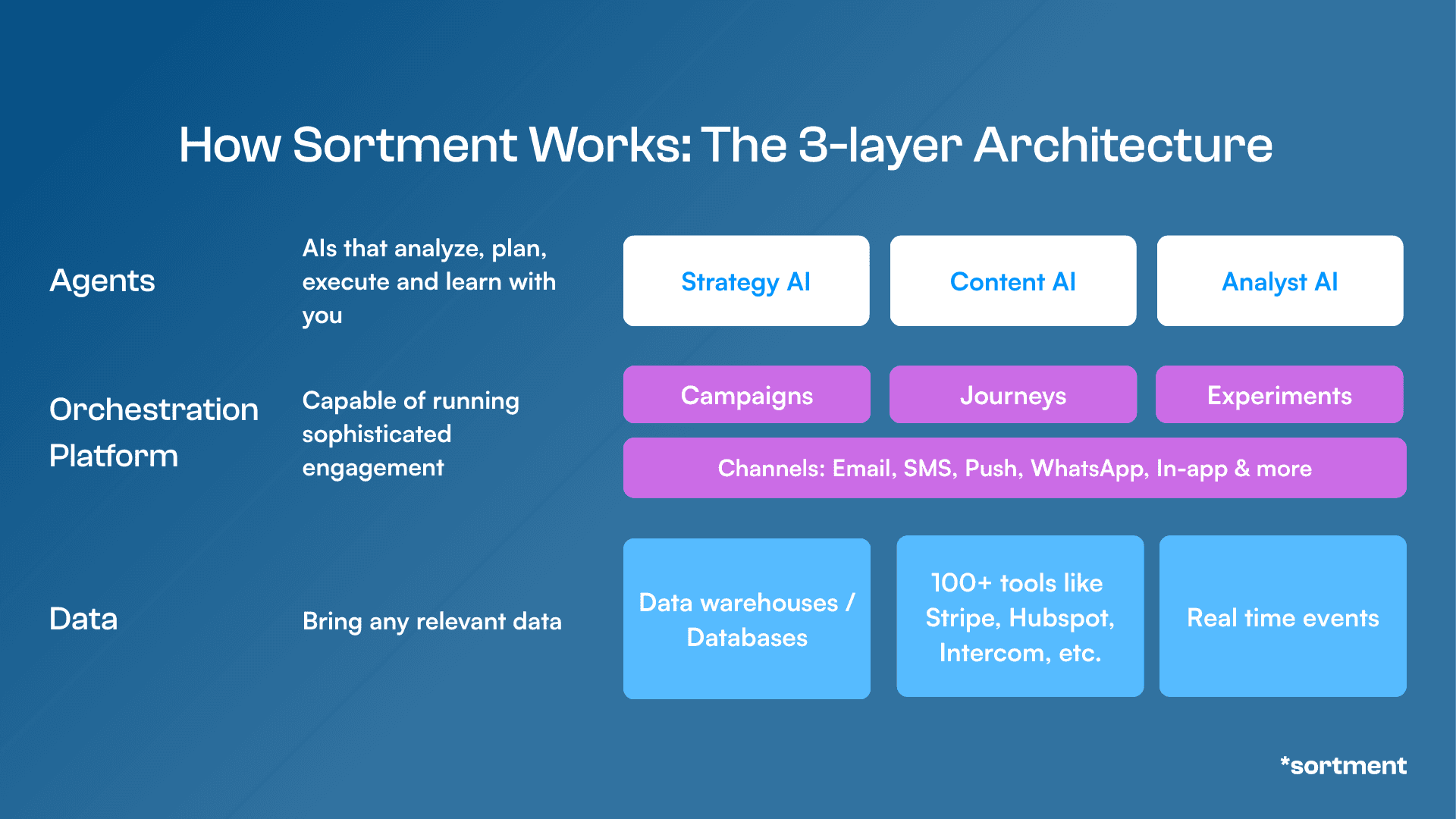
Figure: The 3-layer architecture of Sortment
Sortment's architecture consists of three interconnected layers that work together to automate your entire lifecycle marketing operation.
Layer 1: The Data Foundation
Unlike traditional CEPs that copy your data into their systems, Sortment connects directly to your existing data warehouse:
Snowflake
BigQuery
Databricks
This warehouse-native approach means:
No data duplication: Your customer data stays in your warehouse, reducing costs
Real-time access: Sortment queries your warehouse directly for the freshest data
No migration required: Use Sortment alongside your existing tools during pilots
During onboarding, you provide both read and write access to your warehouse. Sortment reads your customer journey data for analysis and writes campaign execution data (like email sends, opens, clicks) back to your warehouse for attribution and reporting.
The platform also supports integrations via Airbyte or direct API connections if you don't have a data warehouse set up yet.
Layer 2: The Orchestration & Execution Engine
The middle layer handles campaign creation, journey management, and multi-channel orchestration:
Campaigns: One-off email blasts, promotional sends, newsletters
Journeys: Automated workflows triggered by user behavior (abandoned cart, onboarding, win-back)
Experiments: A/B tests, multi-variate tests, holdout groups
Sortment supports all major customer engagement channels:
Email
Push notifications
SMS
WhatsApp
In-app messages
The platform can either replace your existing CEP entirely or work alongside tools like Customer.io, Braze, HubSpot, or MoEngage using reverse ETL to sync audiences and campaign data.
Layer 3: The AI Agents
This is where Sortment differentiates itself from legacy platforms. The AI agent layer consists of three specialized agents that automate the work traditionally done by marketers, data analysts, and campaign managers:
Strategy AI: Analyzes user behavior daily or hourly against your goals, generates hypotheses for campaigns (abandoned cart, repeat purchase, cross-sell), identifies behavioral clusters, and recommends audience segments
Content AI: Creates personalized email templates, push notification copy, and campaign assets from natural language prompts in under 2 minutes; modifies existing templates for different use cases; browses the web for creative references
Operations AI: Automates campaign setup, builds audiences without SQL, creates A/B test variations, and manages campaign execution
All three agents work together through a chat interface. You interact with Sortment like you would with a colleague: you give it goals, provide context, review its work, and approve campaigns before they go live.
Setting Up Sortment: Days, Not Weeks
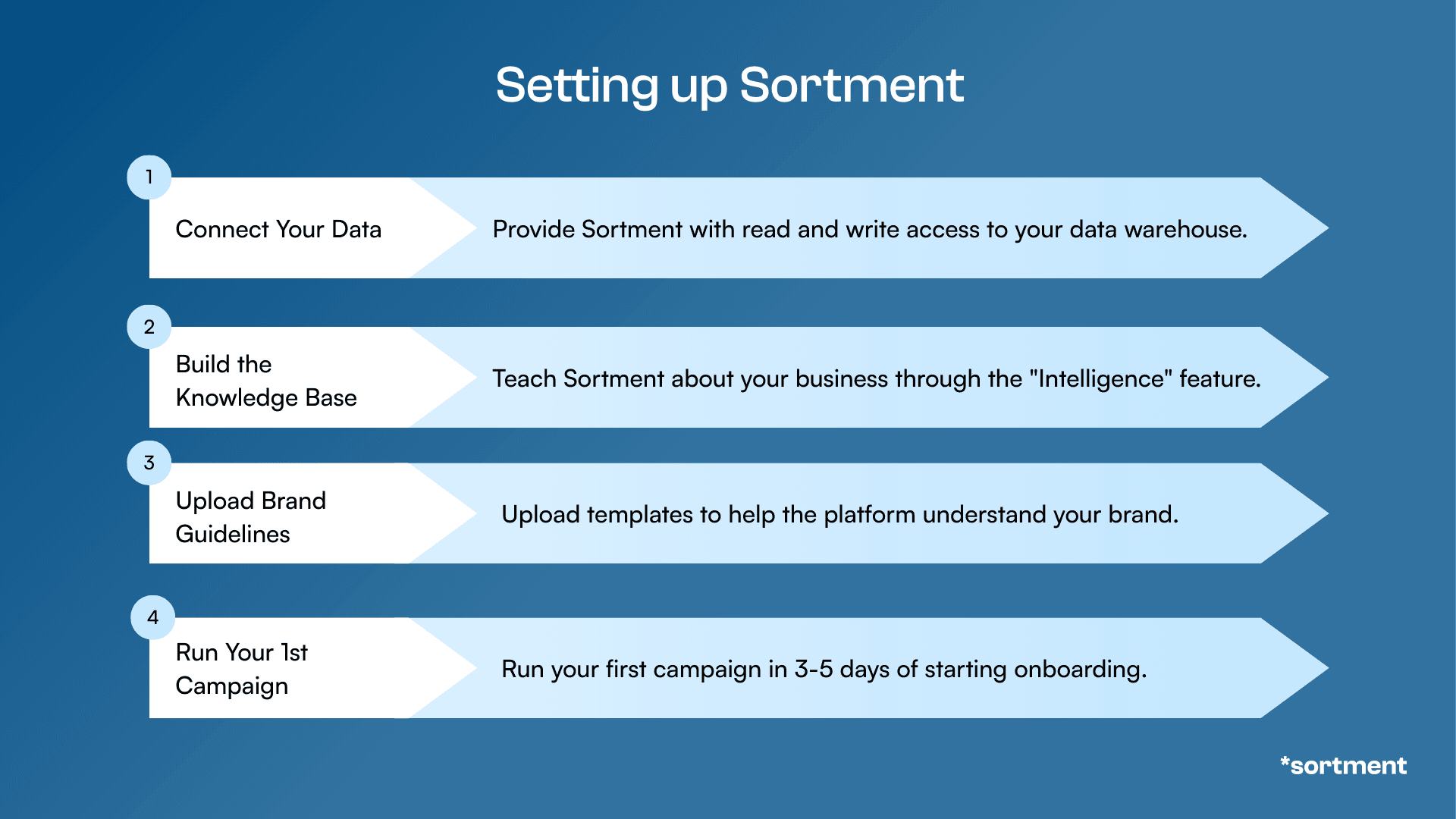
Figure: Sortment's setup takes only 4 steps
One of Sortment's biggest advantages is setup speed. Here's the typical onboarding process:
Step 1: Connect Your Data (Day 1)
Provide Sortment with read and write access to your data warehouse. This typically takes 1-2 hours depending on your organization's security approval process.
If you use AWS, you'll also need to provision an S3 bucket for data caching, which reduces the frequency of warehouse queries and lowers your data warehouse costs.
Step 2: Build the Knowledge Base (Days 1-2)
During onboarding, you teach Sortment about your business through the "Intelligence" feature. This includes:
Product details: What you sell, key features, unique selling propositions
Business model: Free-to-paid, subscription, one-time purchase
Customer lifecycle: How users progress from signup to paid customer
Retention mechanisms: What keeps customers engaged
Past campaign performance: What's worked and what hasn't
Event definitions: What user actions mean in your data schema
One founder described this process: "We had a call where we explained our business context — our product catalog, retention strategy, and goals. The AI used that to generate better campaign recommendations."
Step 3: Upload Brand Guidelines & Templates (Day 2-3)
For Content AI to create on-brand assets, you upload:
HTML email templates
Brand guidelines (fonts, colors, tone of voice)
Image assets and logos
Disclaimers and legal copy
The platform extracts design elements from your existing templates and applies them to new campaigns automatically.
Step 4: Run Your First Campaign (Day 3-5)
With your data connected and knowledge base configured, you can start running campaigns. The typical workflow:
Give Strategy AI a goal: "Improve month-1 retention" or "Increase conversion from free to paid"
Review recommended segments: Strategy AI analyzes your data and suggests high-value audience segments
Generate campaign content: Content AI creates email copy and designs based on your templates
Approve and launch: Operations AI sets up the campaign, and you click approve
Most customers run their first live campaign within 3-5 days of starting onboarding.
Getting Started with Sortment
Many teams choose to start with a Proof of Concept (POC). Instead of committing to a full migration upfront, the POC focuses on moving a specific business metric such as activation, retention, or conversion within a defined time window. This allows your team to evaluate the platform on real outcomes before making a longer-term decision.
If you're curious about how that process works, you can read more about our Proof of Concept.
And if you're exploring different lifecycle platforms and wondering why teams choose Sortment, we’ve outlined the key differences here: Why Sortment.
See also
How the Sortment Proof of Concept Works (30-Day Overview)
How the Sortment Proof of Concept Works (30-Day Overview)
How the Sortment Proof of Concept Works (30-Day Overview)
Learn how the Sortment 30-day Proof of Concept works for lifecycle marketing. Connect your data, focus on one metric, and achieve measurable improvement before committing to the platform.
Learn how the Sortment 30-day Proof of Concept works for lifecycle marketing. Connect your data, focus on one metric, and achieve measurable improvement before committing to the platform.
See what Sortment can do for your goals.
See what Sortment can do for your goals.
Book a 30-minute call. We'll show you how the pilot works with your data and your stack.
Book a 30-minute call. We'll show you how the pilot works with your data and your stack.
AGENTS
CASE STUDIES
RESOURCES
AGENTS
CASE STUDIES
RESOURCES
What is Sortment?
Sortment is an AI-native customer engagement platform that automates lifecycle marketing from strategy to execution. Think of it as "tool plus agency", where the agency work is done by AI agents instead of humans.
Unlike traditional customer engagement platforms (CEPs) that require large teams to operate effectively, Sortment enables a small team or individual + AI to deliver the same outcomes. Instead of spending weeks on setup, manual segmentation, content creation, and campaign execution, Sortment's AI agents handle the grunt work while your team focuses on strategy and approval.
The platform connects directly to your data warehouse (Snowflake, BigQuery, or Databricks), analyzes customer behavior, generates campaign strategies, creates content, and executes campaigns across email, push notifications, SMS, and in-app channels.
The Problem: Why Traditional Customer Engagement Platforms Fall Short
Figure: The problem with traditional customer engagement platforms
Before diving into how Sortment works, let's understand the problem it solves.
Setup Friction: Weeks of Engineering Time Just to Start
Traditional CEPs require extensive engineering work before you can send your first campaign. Every integration needs tickets, data mapping, and custom code. Data must be copied from your warehouse into the platform's database. By the time you're live, market conditions have changed.
One lifecycle marketing lead at a major fitness company described their challenge: "The primary bottleneck is execution bandwidth. We could be running hundreds of journeys with our existing data, but we've only created 3-10 because content creation and campaign setup take too long."
Bandwidth Drain: Campaign Creation Is 70% Grunt Work
Even after setup, running campaigns requires significant manual effort:
Data work: Creating segments, building audiences, writing SQL queries
Content creation: Designing emails, writing copy, creating variations for A/B tests
Campaign setup: Building workflows, setting up triggers, configuring journeys
Analysis: Pulling performance data, generating insights, identifying opportunities
A marketing operations director at a streaming company said it plainly: "We have only 3-10 journeys created versus hundreds possible with existing data. Content creation and campaign setup are taking too long, and we lack the technical capability on the CRM team."
Limited Impact Without Scale: You Can't Test What You Can't Build
The biggest opportunity cost isn't the time spent on execution — it's the experiments you never run. A/B tests take weeks to build. Personalization requires engineering resources. By the time you validate an idea, the opportunity is gone.
As one VP of Product at a hospitality startup explained: "We could fill weekday occupancies during lean periods, but we don't have the bandwidth to experiment fast enough to find what works."
How Sortment Works: The Three-Layer Architecture
Figure: The 3-layer architecture of Sortment
Sortment's architecture consists of three interconnected layers that work together to automate your entire lifecycle marketing operation.
Layer 1: The Data Foundation
Unlike traditional CEPs that copy your data into their systems, Sortment connects directly to your existing data warehouse:
Snowflake
BigQuery
Databricks
This warehouse-native approach means:
No data duplication: Your customer data stays in your warehouse, reducing costs
Real-time access: Sortment queries your warehouse directly for the freshest data
No migration required: Use Sortment alongside your existing tools during pilots
During onboarding, you provide both read and write access to your warehouse. Sortment reads your customer journey data for analysis and writes campaign execution data (like email sends, opens, clicks) back to your warehouse for attribution and reporting.
The platform also supports integrations via Airbyte or direct API connections if you don't have a data warehouse set up yet.
Layer 2: The Orchestration & Execution Engine
The middle layer handles campaign creation, journey management, and multi-channel orchestration:
Campaigns: One-off email blasts, promotional sends, newsletters
Journeys: Automated workflows triggered by user behavior (abandoned cart, onboarding, win-back)
Experiments: A/B tests, multi-variate tests, holdout groups
Sortment supports all major customer engagement channels:
Email
Push notifications
SMS
WhatsApp
In-app messages
The platform can either replace your existing CEP entirely or work alongside tools like Customer.io, Braze, HubSpot, or MoEngage using reverse ETL to sync audiences and campaign data.
Layer 3: The AI Agents
This is where Sortment differentiates itself from legacy platforms. The AI agent layer consists of three specialized agents that automate the work traditionally done by marketers, data analysts, and campaign managers:
Strategy AI: Analyzes user behavior daily or hourly against your goals, generates hypotheses for campaigns (abandoned cart, repeat purchase, cross-sell), identifies behavioral clusters, and recommends audience segments
Content AI: Creates personalized email templates, push notification copy, and campaign assets from natural language prompts in under 2 minutes; modifies existing templates for different use cases; browses the web for creative references
Operations AI: Automates campaign setup, builds audiences without SQL, creates A/B test variations, and manages campaign execution
All three agents work together through a chat interface. You interact with Sortment like you would with a colleague: you give it goals, provide context, review its work, and approve campaigns before they go live.
Setting Up Sortment: Days, Not Weeks
Figure: Sortment's setup takes only 4 steps
One of Sortment's biggest advantages is setup speed. Here's the typical onboarding process:
Step 1: Connect Your Data (Day 1)
Provide Sortment with read and write access to your data warehouse. This typically takes 1-2 hours depending on your organization's security approval process.
If you use AWS, you'll also need to provision an S3 bucket for data caching, which reduces the frequency of warehouse queries and lowers your data warehouse costs.
Step 2: Build the Knowledge Base (Days 1-2)
During onboarding, you teach Sortment about your business through the "Intelligence" feature. This includes:
Product details: What you sell, key features, unique selling propositions
Business model: Free-to-paid, subscription, one-time purchase
Customer lifecycle: How users progress from signup to paid customer
Retention mechanisms: What keeps customers engaged
Past campaign performance: What's worked and what hasn't
Event definitions: What user actions mean in your data schema
One founder described this process: "We had a call where we explained our business context — our product catalog, retention strategy, and goals. The AI used that to generate better campaign recommendations."
Step 3: Upload Brand Guidelines & Templates (Day 2-3)
For Content AI to create on-brand assets, you upload:
HTML email templates
Brand guidelines (fonts, colors, tone of voice)
Image assets and logos
Disclaimers and legal copy
The platform extracts design elements from your existing templates and applies them to new campaigns automatically.
Step 4: Run Your First Campaign (Day 3-5)
With your data connected and knowledge base configured, you can start running campaigns. The typical workflow:
Give Strategy AI a goal: "Improve month-1 retention" or "Increase conversion from free to paid"
Review recommended segments: Strategy AI analyzes your data and suggests high-value audience segments
Generate campaign content: Content AI creates email copy and designs based on your templates
Approve and launch: Operations AI sets up the campaign, and you click approve
Most customers run their first live campaign within 3-5 days of starting onboarding.
Getting Started with Sortment
Many teams choose to start with a Proof of Concept (POC). Instead of committing to a full migration upfront, the POC focuses on moving a specific business metric such as activation, retention, or conversion within a defined time window. This allows your team to evaluate the platform on real outcomes before making a longer-term decision.
If you're curious about how that process works, you can read more about our Proof of Concept.
And if you're exploring different lifecycle platforms and wondering why teams choose Sortment, we’ve outlined the key differences here: Why Sortment.